
A computer algebra system (CAS) is mathematical software that can manipulate mathematical formulae in a way similar to the traditional manual computations of mathematicians and scientists. This type of system supports a wide range of mathematics including linear algebra, calculus, and algebraic and ordinary differential equations.
A CAS offers a rigorous environment for defining and working with structures such as groups, rings, fields, modules, algebras, schemes, curves, graphs, designs, codes and many others.
They have been extensively used in higher education.
The main features of a CAS include:
- Numerical Computations: The software can determine numerical approximations of solutions, derivatives, integrals, differential equations, etc. Solve, manipulate, and plot functions without needing to generate numeric data. Often problems that cannot be solved explicitly can be solved numerically, and often only a numerical answer is sufficient.
- Data Analysis: Having data is not sufficient; we need to extract useful information from it. There are many algorithms designed for data analysis, most of which involve too much work to be done by manual computations. CAS’s put these algorithms in one place, and offer an environment where the algorithms are easy to implement.
- Data Visualization: CAS’s can graph 2D and 3D functions in a variety of ways. They are also designed to graph vector fields and solutions to differential equations.
- Symbolic Computations: Most of the CAS’s can perform symbolic manipulation of expressions: reducing, expanding, simplifying, derivatives, antiderivatives, etc. Unlike numerical computations, which can exhibit floating-point errors, symbolic computations are determined exactly. They can therefore provide the exact answer to an equation (as opposed to a decimal approximation), and they can express results in terms of a wide variety of previously defined functions.
A CAS automates tedious and sometimes difficult algebraic manipulation tasks. The principal difference between a CAS and a traditional calculator is the ability to deal with equations symbolically rather than numerically.
The chart below offers our rating for each software. Some of the software is very specialized, designed to fill a particular niche. This makes comparisons difficult. All of the software is free and open source goodness.
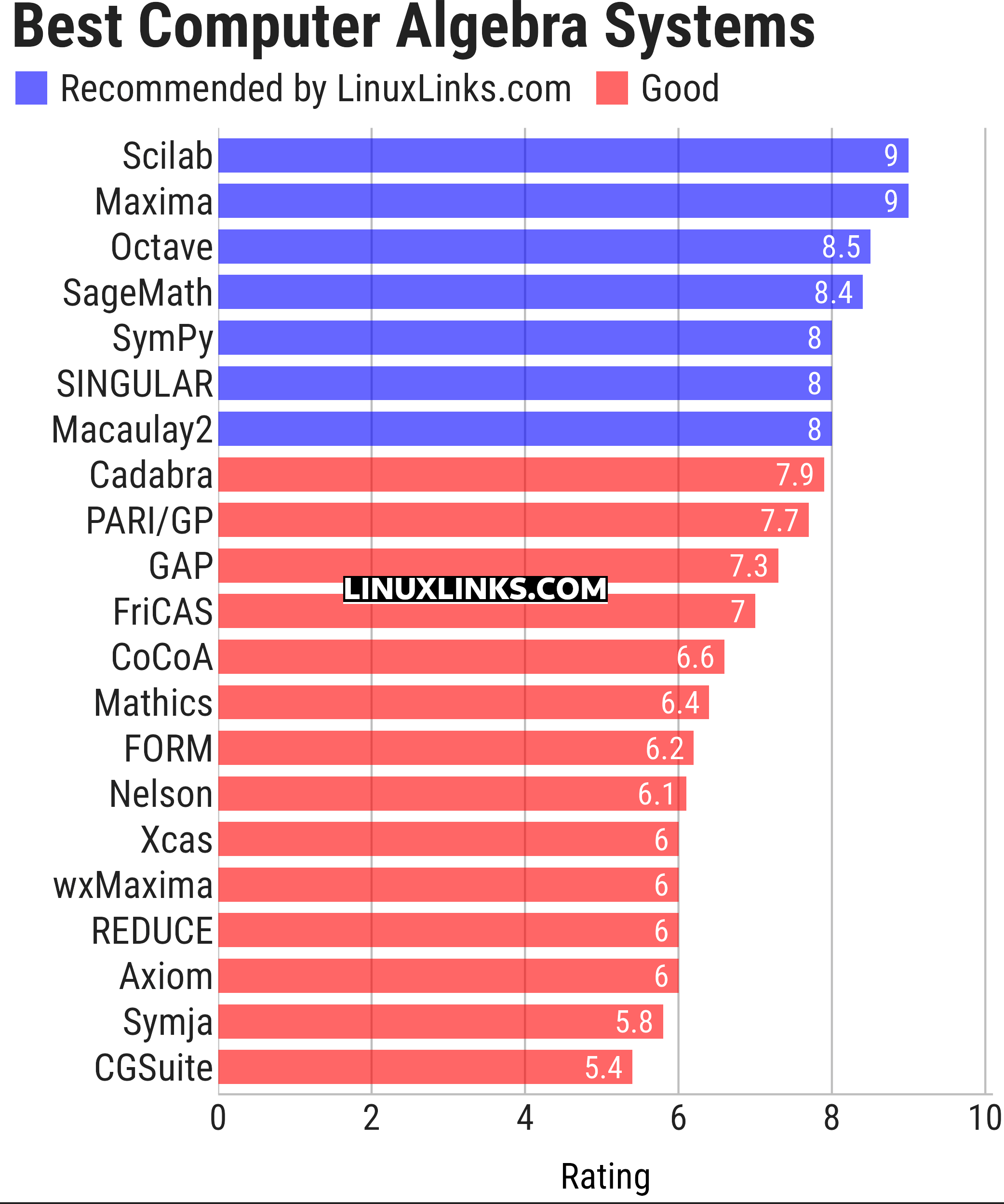
Let’s explore the 21 algebra systems at hand. Click the links in the table below to learn more about each program.
| Computer Algebra Systems | |
|---|---|
| Scilab | Numerical computational package |
| Maxima | System for the manipulation of symbolic and numerical expressions |
| Octave | Powerful programming language with built-in plotting and visualization tools |
| SageMath | Open source alternative to Magma, Maple, Mathematica and Matlab |
| SymPy | Python library for symbolic mathematics |
| SINGULAR | Computer Algebra System for polynomial computations |
| Macaulay2 | Software system for research in algebraic geometry |
| Cadabra | Symbolic computer algebra system for field theory problems |
| PARI/GP | Widely used algebra system designed for fast computations in number theory |
| GAP | System for computational discrete algebra |
| FriCAS | Fork of Axiom |
| CoCoA | System for doing computations in commutative algebra |
| Mathics | General-purpose CAS with Mathematica-compatible syntax and functions |
| FORM | Symbolic Manipulation System |
| Nelson | Numerical computational language |
| wxMaxima | GUI for the sublime Maxima CAS |
| Xcas | Cross-platform mathematical environment |
| REDUCE | General-purpose computer algebra system for symbolic computation |
| Axiom | General purpose Computer Algebra system |
| Symja | Computer algebra system and symbolic mathematics library |
| CGSuite | For research in combinatorial game theory |
This article has been updated to reflect the changes outlined in our recent announcement.
 Explore our comprehensive directory of recommended free and open source software. Our carefully curated collection spans every major software category. Explore our comprehensive directory of recommended free and open source software. Our carefully curated collection spans every major software category.This directory is part of our ongoing series of informative articles for Linux enthusiasts. It features hundreds of detailed reviews, along with open source alternatives to proprietary solutions from major corporations such as Google, Microsoft, Apple, Adobe, IBM, Cisco, Oracle, and Autodesk. You’ll also find interesting projects to try, hardware coverage, free programming books and tutorials, and much more. Know a useful open source Linux program that we haven’t covered yet? Let us know by completing this form. |
Please read our Comment Policy before commenting.
Can you please share what tool produces the top image, with all the bullets and their relations?
It’s SageMath which is proficient for visualizing maths.
Giac/xcas and qcas (qt front-end) should added to this list
Execellent one: Reduce
What program has symbolic solver like in TI-89 here you can just write solve(a=b*c,c) to solve c which gives c=a/b
Oh looks like Qalculate can do it just like TI-89
Octave “Symbolic package” can’t solve shait. My TI-89 calculator solves anything while Octaves Symbolic just can’t. It’s pretty much useless.
SMATH Studio / CalcPad
SMath Studio is freeware so it’s not eligible for inclusion in this article. While CalcPad is open source, it’s not a CAS. And it’s not even clear if it’s a native Linux program.
Just a note on CalcPad, under Linux it only offers a command line interpreter and needs .NET. It’s not a CAS, and there are far better terminal-based open source calculator tools for Linux. So this gets a big thumbs down from us.