

A port scanner is a utility which probes a server or host to verify if the virtual ports of a system are open or closed. Ports allow different applications on the same computer to share network resources simultaneously.
Computers that are connected to a local area network or internet run many different services that listen at well-known (and not so well-known) port numbers. Port numbers range from 0 to 65535, with port numbers from 0 to 1023 considered to be the well-known ports. These include ports reserved for the File Transfer Protocol (FTP), Secure Shell (SSH), telnet, Domain Name System (DNS), Hypertext Transfer Protocol (HTTP) used in the World Wide Web, Network News Transfer Protocol (NNTP), to name a few. Port numbers from 1024 to 49151 are known as registered ports, and the range from 49152 to 65535 are allocated to dynamic or private ports.
Port scanning is a popular technique used by attackers to find services that they may be able to compromise. A port scan assists the attacker in finding which ports are available. The scan sends a message to each port, with the response indicating whether the port is used and can therefore be probed further for weaknesses. There are a variety of different forms of scanning which include TCP, SYN, UDP, ACK, Window, and FIN scanning.
However, port scanning has many legitimate uses such as network inventory and the verification of the security of a network. Port scanners therefore represent an important tool for users and system administrators to verify the security policies of their computers and network.
Here’s our verdict on the best graphical port scanners. We only include free and open source software here.
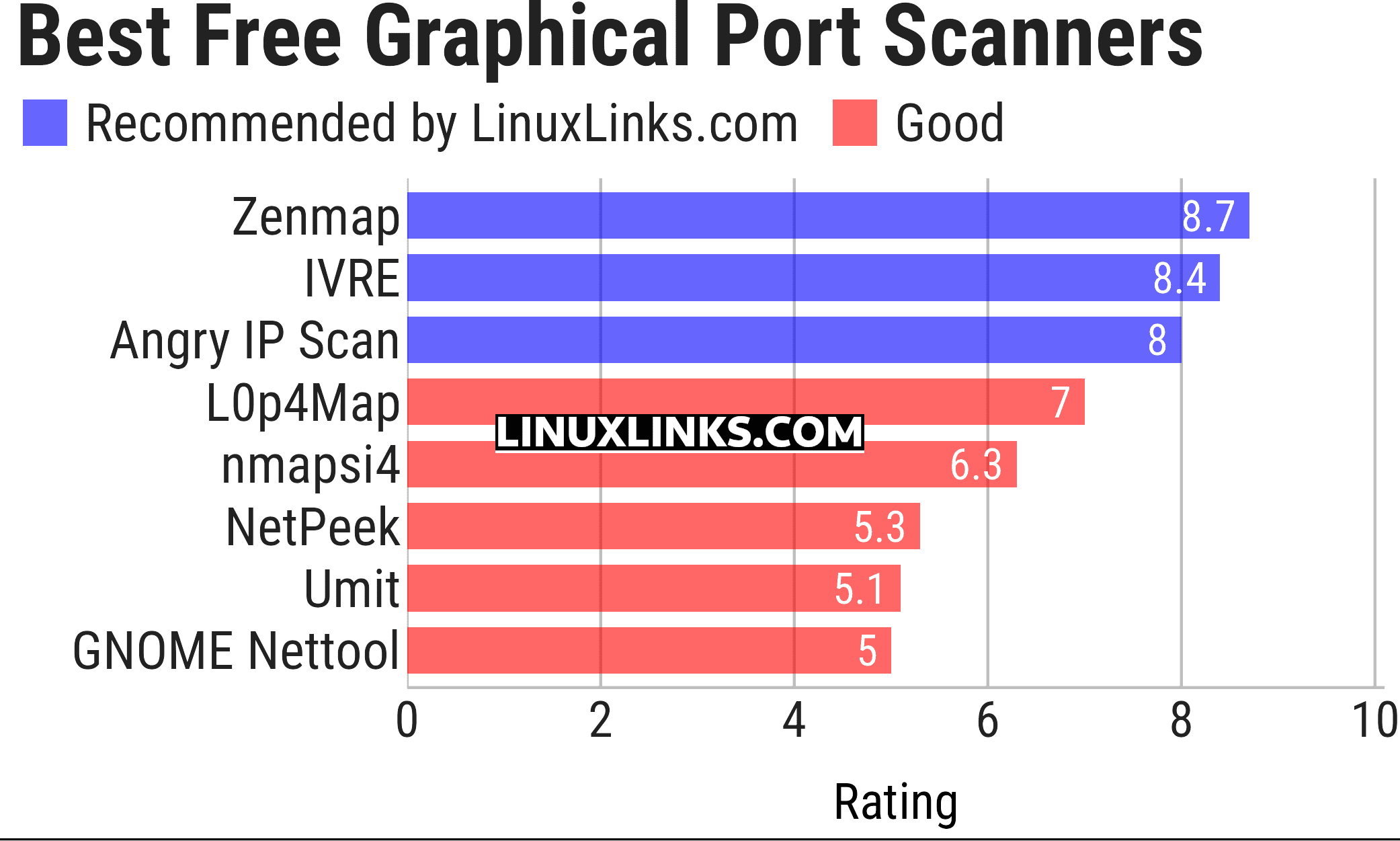
We cover terminal-based port scanners in a separate article.
Let’s explore the port scanners in more detail. The table below links to dedicated pages for each application explaining, in detail, the software’s features.
| Graphical Port Scanners | |
|---|---|
| Zenmap | The Network Mapper Front End |
| IVRE | Network recon framework written in Python |
| Angry IP Scan | Scans IP addresses and ports |
| L0p4Map | Network monitoring, discovery and interactive topology visualization |
| NmapSI4 | Qt5-based GUI for Nmap |
| NetPeek | Discover devices on your local network |
| Umit | Network tool and port scanner developed in PyGTK. |
| GNOME Nettool | GNOME interface for various networking tools |
This article has been updated to reflect the changes outlined in our recent announcement.
 Explore our carefully curated directory of recommended free and open source software, covering every major software category. Explore our carefully curated directory of recommended free and open source software, covering every major software category.The directory forms part of our extensive collection of articles for Linux enthusiasts. It includes hundreds of detailed reviews, together with free and open source alternatives to proprietary software from companies such as Google, Microsoft, Apple, Adobe, IBM, Cisco, Oracle, and Autodesk. LinuxLinks also covers interesting projects worth exploring, Linux-compatible hardware, free programming books and tutorials, and much more. Know a useful free and open source Linux application that we haven’t covered? Tell us about it using our submission form. |
Please read our Comment Policy before commenting.
Netpeek is great for quick lan scans, nice gui, fast n easy
Yes, I agree, it’s a good tool.