

Translation is the process of reworking text from one language into another to maintain the original message and communication.
But, like everything else, there are different methods of translation, and they vary in form and function.
Google Translate needs no introduction, being probably the most well-known multilingual neural machine translation service software out there. It translates multiple forms of texts and media such as words, phrases and webpages. Google Translate is not open source software.
There is a wide range of translation software available for Linux. Some of the tools included are front-end to other services. We’ve also included software which translates text on your local machine, and we include both GUI and CLI tools.
Here’s our verdict captured in a legendary LinuxLinks-style ratings chart. Only free and open source software is eligible for inclusion.
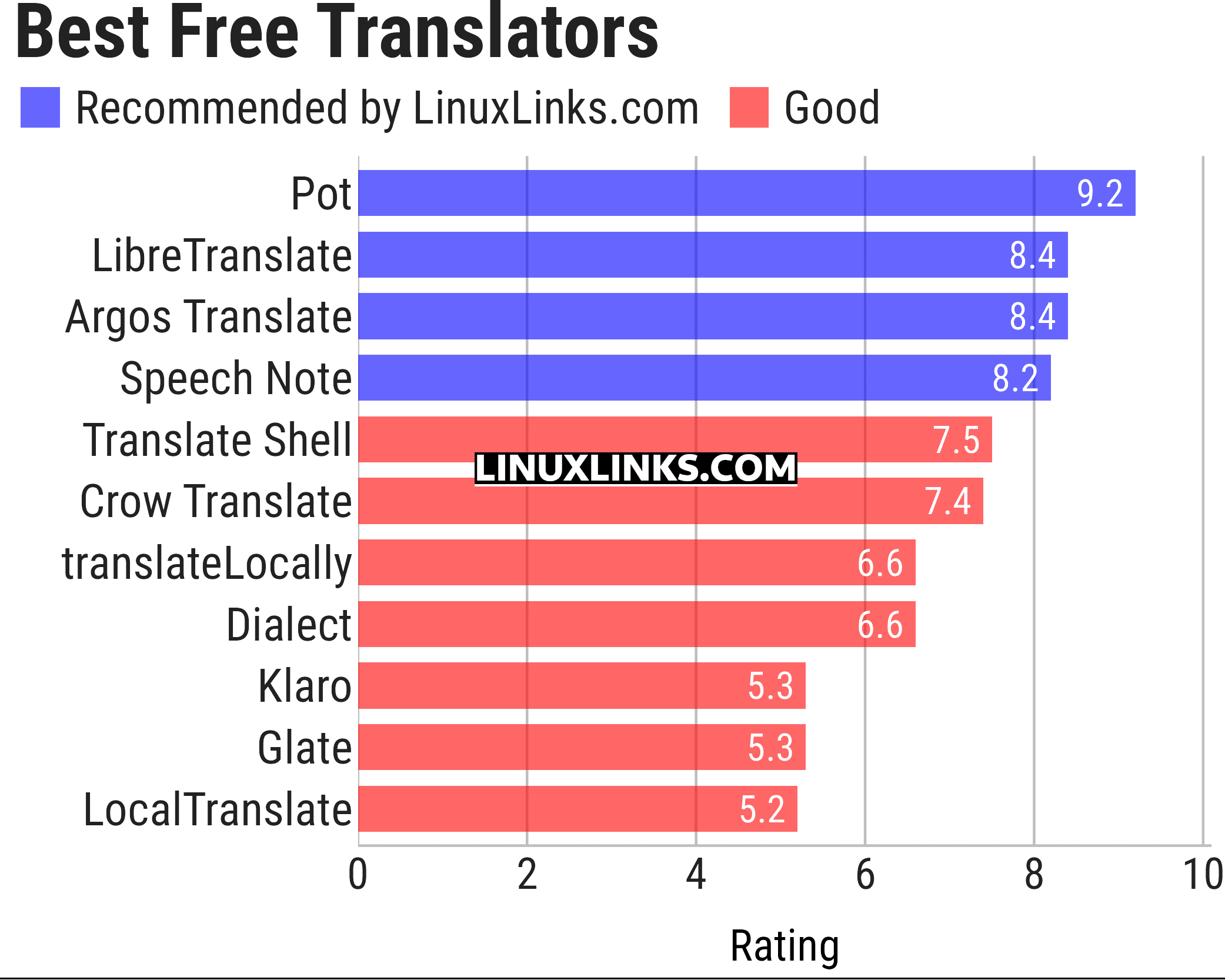
Click the links in the table below to learn more about each tool.
| Translators | |
|---|---|
| Pot | Highly versatile translator that offers translation by selection and input |
| LibreTranslate | Machine translation API which is entirely self-hoste |
| Argos Translate | State of the art neural machine translation software. |
| Speech Note | Combines Speech to Text, Text to Speech and Machine Translation |
| Translate Shell | CLI powered by Google Translate, Bing Translator, Yandex, and Apertium. |
| Crow Translate | Cross-platform, lightweight, translator |
| translateLocally | Translation on your local machine with a GUI |
| Dialect | Translation app for GNOME |
| Klaro | Simple and fast translation app |
| Glate | Google Translator and Text To Speech Service on Linux Desktop |
| LocalTranslate | Machine translation locally using Firefox translation models |
This article has been updated to reflect the changes outlined in our recent announcement.
 Explore our comprehensive directory of recommended free and open source software. Our carefully curated collection spans every major software category. Explore our comprehensive directory of recommended free and open source software. Our carefully curated collection spans every major software category.This directory is part of our ongoing series of informative articles for Linux enthusiasts. It features hundreds of detailed reviews, along with open source alternatives to proprietary solutions from major corporations such as Google, Microsoft, Apple, Adobe, IBM, Cisco, Oracle, and Autodesk. You’ll also find interesting projects to try, hardware coverage, free programming books and tutorials, and much more. Know a useful open source Linux program that we haven’t covered yet? Let us know by completing this form. |
Please read our Comment Policy before commenting.