

Summary
Clapper is an exciting development. We love that it reduces the space required by the playback controls to the absolute minimum. Combine that with a borderless window without a header, and this media player is immediately appealing. The floating mode is sublime.
Hardware acceleration works well. On Intel systems, you can verify hardware video acceleration is enabled with the command.
$ sudo intel_gpu_top
Here’s the output we see when playing a video.
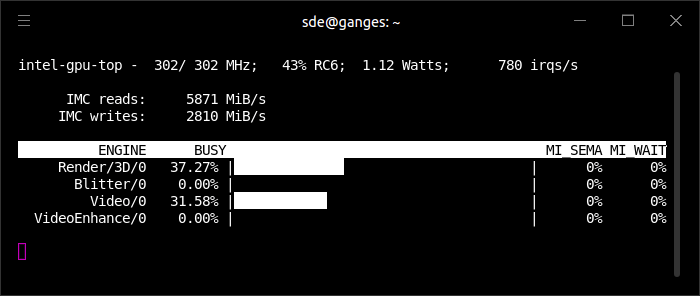
The Video Engine is greater than 0% indicating that hardware video acceleration is in operation. Hardware acceleration reduces CPU and RAM usage.
Memory usage is reasonable. Playing 3840×2160 H.264 video, the software consumes around 280MB of RAM. That’s slightly higher than the development release of VLC 4.
The software is in an early stage of development so it’s lacking a lot of functionality offered by our recommended free and open source media players. And there’s a fair share of bugs along the way. But Clapper might already meet your feature requirements.
Give it a whirl and let us know your opinion in the comments box below.
Website: github.com/Rafostar/clapper
Support:
Developer: Rafał Dzięgie
License: GNU General Public License v3.0
Clapper is written in JavaScript and C. Learn JavaScript with our recommended free books and free tutorials. Learn C with our recommended free books and free tutorials.
Pages in this article:
Page 1 – Introduction
Page 2 – In Operation
Page 3 – Summary
Related Software
| Media Players | |
|---|---|
| VLC | Cross-platform multimedia player and framework |
| mpv | Media player for the command line. libmpv is used by many front-ends |
| QMPlay2 | Qt based video and audio player |
| MPlayer | Movie player which runs on many systems |
| SMPlayer | Qt based MPlayer front-end |
| GridPlayer | Play multiple videos simultaneously |
| Parole | Modern simple media player based on the GStreamer framework |
| MPC-QT | Clone of Media Player Classic |
| clapper | GNOME media player built using GJS with GTK4 toolkit |
| Totem | Movie player for the GNOME desktop based on GStreamer |
| Dragon Player | Multimedia player with a focus on simplicity rather than features |
| xine | Video player for playing CDs, DVDs, BluRays and VCDs. |
| Showtime | GNOME media player |
| Glide | Simple and minimalistic media player |
| Phantom Player | Simple video player |
| Daikhan | Media player for the modern desktop |
| QtAV | Cross-platform multimedia framework based on Qt and FFmpeg |
| SparkPlayer | Terminal-based media player for local music and video collections |
| Rage | Simple video and audio player |
| Kaffeine | Simple, easy to use, full featured media player |
Read our verdict in the software roundup.
 Explore our carefully curated directory of recommended free and open source software, covering every major software category. Explore our carefully curated directory of recommended free and open source software, covering every major software category.The directory forms part of our extensive collection of articles for Linux enthusiasts. It includes hundreds of detailed reviews, together with free and open source alternatives to proprietary software from companies such as Google, Microsoft, Apple, Adobe, IBM, Cisco, Oracle, and Autodesk. LinuxLinks also covers interesting projects worth exploring, Linux-compatible hardware, free programming books and tutorials, and much more. Know a useful free and open source Linux application that we haven’t covered? Tell us about it using our submission form. |
Please read our Comment Policy before commenting.
I’ve got so accustomed to Firefox’s picture in picture feature that I started to dislike window decorations on video playback.
Clapper’s floating mode is brilliant. Overall the video player is pretty basic when it comes to functionality but from brief experiments it’ll definitely stay on my system. I haven’t yet tried using it as an audio player.
Forgot to mention that it only runs under Linux, the developer doesn’t intend to port the software to Windows or macOS which is a shame. I run all 3 operating systems and prefer to use the same software on each environment.
In the long term Clapper will probably be my main media player. It’s already awesome.
Was the RAM usage tested on X11 or Wayland? I ask cause Clapper seems to perform better and uses less resources on Wayland session.
RAM usage was tested under X11