

HyperHDR is an ambient lighting implementation for television and music sets based on the video and audio streams analysis. Focused on stability while ensuring performance and quality.
Its focused on stability while ensuring performance and quality. There is single and multi-threaded video processing optimization.
This is free and open source software.
Key Features
- Very low CPU usage on SoCs like Raspberry Pi.
- Lightweight, we don’t use bindings to heavy components like Python or Java.
- Low latency video processing as color source for LED strip and lamps.
- Support for multithreading that makes Raspberry Pi capable of processing HQ video stream.
- High portability on various ARM embedded platforms.
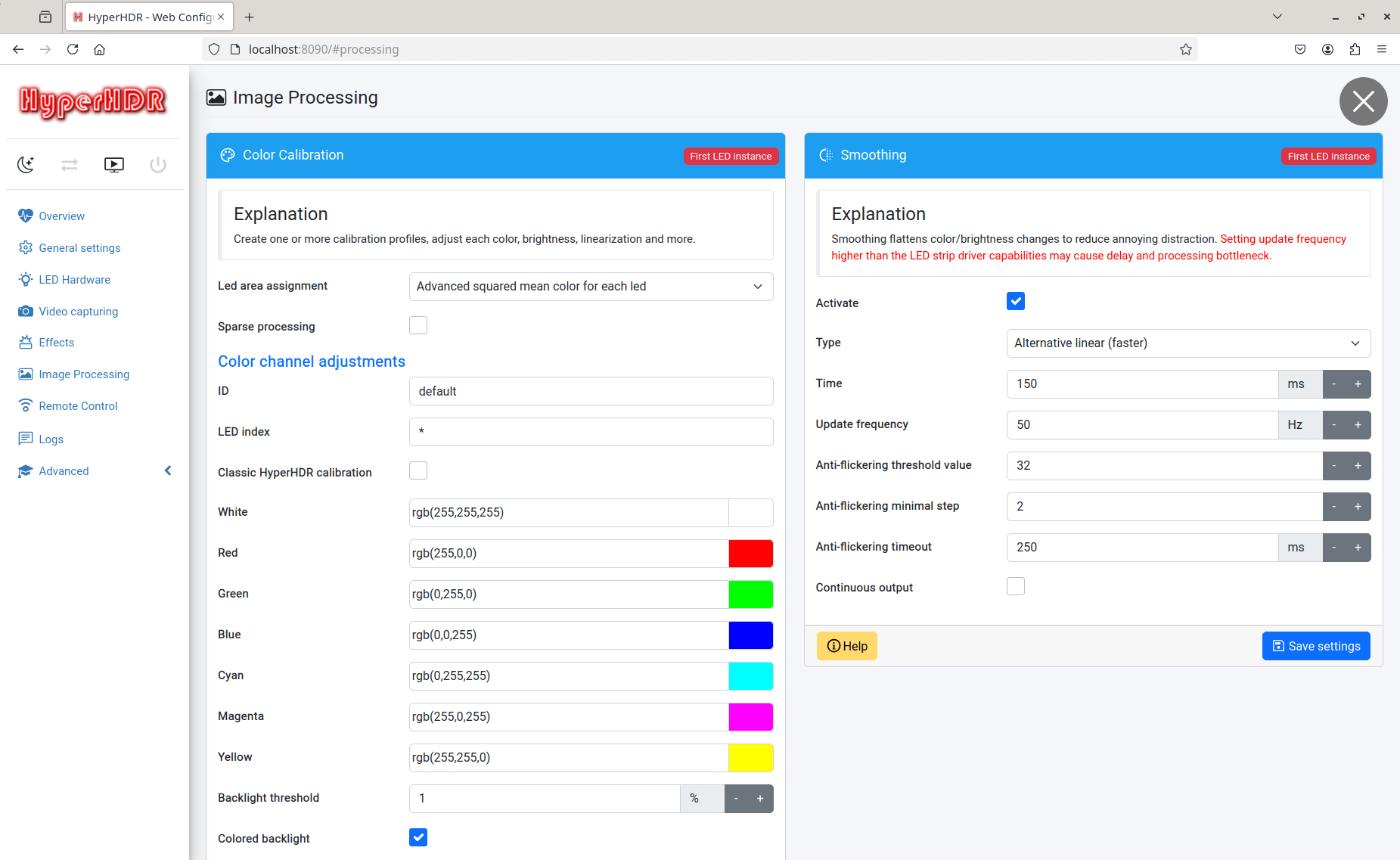
- Video post-processing filter to eliminate LED flickering.
- Modern interface using Bootstrap 5 and SVG icons.
- Provides vital information about your OS condition: CPU & RAM usage, CPU temperature, undervoltage detection, internal components performance including USB grabber and LED devices.
- Support for USB grabbers under Linux, Windows 10, macOS.
- Pipewire/Portal hardware-accelerated screen capturer for Linux/Wayland.
- DirectX screen grabber with pixel and vertex shader processing acceleration for Windows 10/11.
- DirectX screen grabber supports native Windows HDR modes like
- DXGI_FORMAT_R16G16B16A16_FLOAT and multi-monitor.
- Dynamic video cache buffers. Now Rpi can process even 1080p120 NV12 stream without any size decimation.
- Built-in audio visualization effects using spectrum analysis.
- MQTT support for IoT.
- Entertainment API v2: per-channel support for Philips Gradient Strip and others.
- Automatic LUT calibration detects grabber model specific properties for the best quality of HDR/SDR using MP4 test files.
- Optimized multi-instances. You can use for example your TV LED strip and multiple WLED or Philips Hue light sources.
- Built-in latency benchmark for USB grabbers.
- Support for high-quality P010 video format.
- Easy LED strip geometry editing process, automatic or manual with mouse and context menu per single LED.
- Automatic signal detection with smart learning capability for USB grabbers.
- SK6812 RGBW: advanced calibration of the white color channel for HyperSerialEsp8266,
- HyperSerialESP32, HyperSPI, HyperSerialPico.
- Tone mapping for external flatbuffers/protobuf sources.
- Built-in LUT table generator and LUT import tool.
- Support for 48bits HD108 LED strip.
- Support WS281x, APA102, HD107, SK9822 and SK6812 RGBW LED strips using the fastest possible cable solution for generic ESP8266/ESP32/rp2040 external LED drivers: HyperSPI. Alternatively, there is a simple solution using a high-speed connection via a standard USB serial port for ESP8266/ESP32/Pico with data integrity check and white channel calibration: HyperSerialEsp8266 and HyperSerialESP32 and for Raspberry Pi Pico HyperSerialPico.
- Cross-platform support – runs under Linux, macOS, and Windows.
Website: github.com/awawa-dev/HyperHDR
Support:
Developer: awawa-dev
License: MIT License
HyperHDR is written in C++. Learn C++ with our recommended free books and free tutorials.
Related Software
| HDR Imaging Software | |
|---|---|
| RawTherapee | The Experimental Raw Photo Editor |
| OpenEXR | HDR image file format and HDR utilities |
| Hugin | Panorama photo stitching program |
| tev | High dynamic range image comparison tool |
| HyperHDR | Ambient lighting implementation for television and music sets |
| HDRView | Depth-map and high-dynamic range image viewer |
| Luminance HDR | Provides a workflow for HDR imaging |
| Radiance | Lighting simulation and rendering system |
| HDRMerge | Combine two or more raw images into a single raw |
| pfstools | Command line HDR manipulation programs |
| SimpleImageViewer | High-performance image viewer |
| CinePaint | Works with 16-bit and floating point pixels for HDR imaging |
Read our verdict in the software roundup.
 Explore our comprehensive directory of recommended free and open source software. Our carefully curated collection spans every major software category. Explore our comprehensive directory of recommended free and open source software. Our carefully curated collection spans every major software category.This directory is part of our ongoing series of informative articles for Linux enthusiasts. It features hundreds of detailed reviews, along with open source alternatives to proprietary solutions from major corporations such as Google, Microsoft, Apple, Adobe, IBM, Cisco, Oracle, and Autodesk. You’ll also find interesting projects to try, hardware coverage, free programming books and tutorials, and much more. Discovered a useful open source Linux program that we haven’t covered yet? Let us know by completing this form. |
Please read our Comment Policy before commenting.