
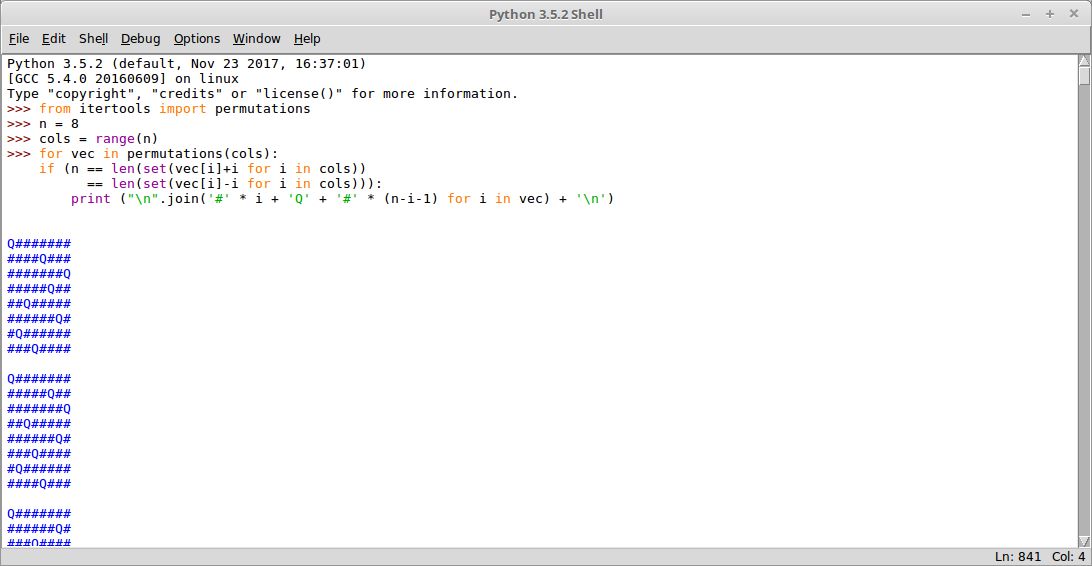
IDLE is Python’s Integrated Development and Learning Environment, providing a graphical interface for writing, executing and debugging Python programs. It combines an interactive Python shell with a source code editor, making it particularly useful for beginners and programmers who prefer a straightforward development environment.
The interactive shell allows users to enter Python statements and immediately inspect their results. Separate editor windows provide facilities for developing longer programs, which can be executed within the same environment.
IDLE is implemented in Python using the Tkinter graphical toolkit. Its modest feature set avoids much of the complexity associated with larger integrated development environments while retaining essential editing, navigation and debugging tools.
It is especially well suited to learning Python, testing small programs and exploring language features interactively.
This is free and open source software.
Key Features
- Interactive Python shell with colour-coded input, output and error messages.
- Multi-window source code editor with syntax highlighting and multiple undo levels.
- Smart indentation, automatic completion and contextual function calltips.
- Execute Python modules directly from the editor and inspect results in the shell.
- Syntax checking before running a program.
- Integrated debugger supporting breakpoints, stepping and inspection of variables.
- Stack viewer for examining exception tracebacks and program state.
- Search and replace within files, with support for searching across multiple files.
- Module and path browsers for examining Python packages, classes and functions.
- Code context display showing surrounding block statements while scrolling.
- Configurable fonts, colour themes, indentation settings and keyboard shortcuts.
- Editor tools for commenting, indentation adjustment and text formatting.
- Shell history navigation, execution interruption and environment restarting.
- Support for extensions and additional help resources.
- Cross-platform support – runs on Linux, macOS, and Windows.
Website: docs.python.org/3/library/idle.html
Support:
Developer: Guido van Rossum and contributors
License: Python Software Foundation License Version 2
IDLE was the Python IDE we grew up with, but there are better IDEs now available for beginners. See the Python IDEs Home Page for my recommendations.
IDLE is written in Python. Learn Python with our recommended free books and free tutorials.
Related Software
| Open Source Python Shells | |
|---|---|
| IPython | Enhanced interactive Python shell |
| ptpython | Advanced Python Read-Eval-Print Loop |
| bpython | Fancy interface to the Python interpreter for Linux, BSD, OS X and Windows |
| IDLE | Integrated development environment for Python |
| DreamPie | Python shell which is designed to be reliable and fun |
Read our verdict in the software roundup.
| Python Integrated Development Environments | |
|---|---|
| PyCharm | Full-featured IDE. Two editions are available, one is open source software |
| Spyder | Python development environment providing MATLAB-like features |
| eric | Full featured Python editor and IDE, written in Python |
| Thonny | Tk-based IDE designed for novice programmers |
| PyDev | Python plugin for Eclipse |
| Leo | PIM, IDE and outliner |
| Pyzo | Interactive editor for scientific Python |
| PTK | Interactive environment for Python |
| IDLE | Python’s Integrated Development and Learning Environment |
Read our verdict in the software roundup.
 LinuxLinks helps you discover the best free and open source software for Linux. Explore our extensive collection of recommended applications, including alternatives to popular proprietary software. LinuxLinks helps you discover the best free and open source software for Linux. Explore our extensive collection of recommended applications, including alternatives to popular proprietary software.We also publish software reviews, Linux tutorials, hardware reviews, free programming books and articles covering the wider open source community. Browse our Linux resources to discover more. Know a useful free and open source Linux application we haven't covered? Suggest a program for inclusion. Has your software been featured on LinuxLinks? Display one of our Featured on LinuxLinks badges on your website or GitHub README. |
Please read our Comment Policy before commenting.