
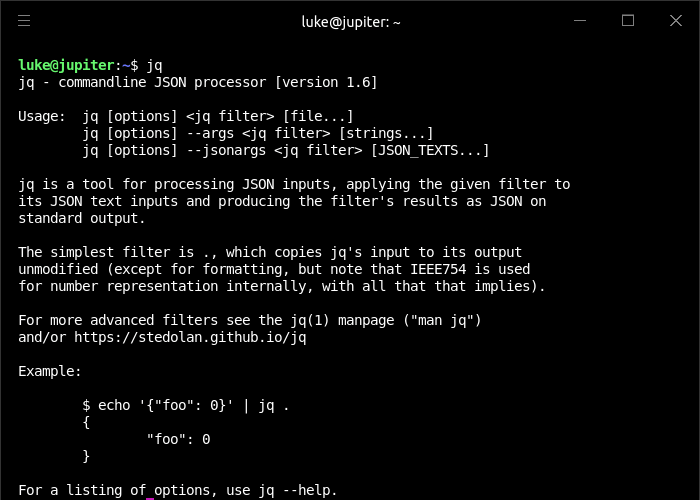
jq is a lightweight and flexible command-line JSON processor. A jq program is a “filter”: it takes an input, and produces an output. There are a lot of builtin filters for extracting a particular field of an object, or converting a number to a string, or various other standard tasks.
Filters can be combined in various ways – you can pipe the output of one filter into another filter, or collect the output of a filter into an array.
Some filters produce multiple results, for instance there’s one that produces all the elements of its input array. Piping that filter into a second runs the second filter for each element of the array. Generally, things that would be done with loops and iteration in other languages are just done by gluing filters together in jq.
jq is like sed for JSON data – you can use it to slice and filter and map and transform structured data with the same ease that sed, awk, grep and friends let you play with text.
jq can mangle the data format that you have into the one that you want with very little effort, and the program to do so is often shorter and simpler than you’d expect.
The input to jq is parsed as a sequence of whitespace-separated JSON values which are passed through the provided filter one at a time. The output(s) of the filter are written to standard out, again as a sequence of whitespace-separated JSON data.
Website: stedolan.github.io/jq
Support: Manual, GitHub Code Repository
Developer: Stephen Dolan
License: MIT License
jq is written in C. Learn C with our recommended free books and free tutorials.
Related Software
| JSON Tools | |
|---|---|
| jq | Lightweight and flexible JSON processor. It's like sed for JSON |
| fx | JSON viewer with streaming and mouse support |
| jaq | jq clone focused on correctness, speed, and simplicity. |
| gron | Transforms JSON into discrete assignments to make it easier to grep |
| gojq | Pure Go implementation of jq |
| jless | Command-line JSON viewer written in Rust |
| jnv | Navigates JSON offering a viewer and filter editor |
| JSON Editor | View, edit, format, and validate JSON |
| Dasel | Query, modify and transform structured data |
| jid | JSON incremental digger by using filtering queries |
| jo | Small utility to create JSON objects |
| jsonrepair | Repair malformed and invalid JSON documents |
| faq | Billed as a more flexible jq supporting additional formats |
| jello | Filter JSON and JSON Lines data with Python syntax |
| jq but an interoperable configuration format transcoder | |
| json-tui | JSON terminal UI |
| jqp | TUI playground to experiment with jq |
| emuto | Small language for manipulating and restructuring JSON and other data |
| svelte-jsoneditor | View, edit, format, transform, and validate JSON |
| qo | Query JSON, CSV, and TSV files using SQL |
| jql | Query and process JSON data |
| Janice | Desktop app for viewing large JSON files |
| unqery | Query and transform JSON data |
| Twig | Terminal JSON viewer and YAML viewer |
| jtc | Extract, manipulate and transform source JSON |
| pyfx | Python-native TUI JSON viewer |
| OTree | Interactive viewer for structured data |
| kirill | JSON validator |
| jshon | Parses, reads and creates JSON. It's designed to be as usable as possible |
| jsawk | Like awk, but for JSON |
| jiq | Interactive JSON query tool |
Read our verdict in the software roundup.
 Explore our carefully curated directory of recommended free and open source software, covering every major software category. Explore our carefully curated directory of recommended free and open source software, covering every major software category.The directory forms part of our extensive collection of articles for Linux enthusiasts. It includes hundreds of detailed reviews, together with free and open source alternatives to proprietary software from companies such as Google, Microsoft, Apple, Adobe, IBM, Cisco, Oracle, and Autodesk. LinuxLinks also covers interesting projects worth exploring, Linux-compatible hardware, free programming books and tutorials, and much more. Know a useful free and open source Linux application that we haven’t covered? Tell us about it using our submission form. |
Please read our Comment Policy before commenting.