

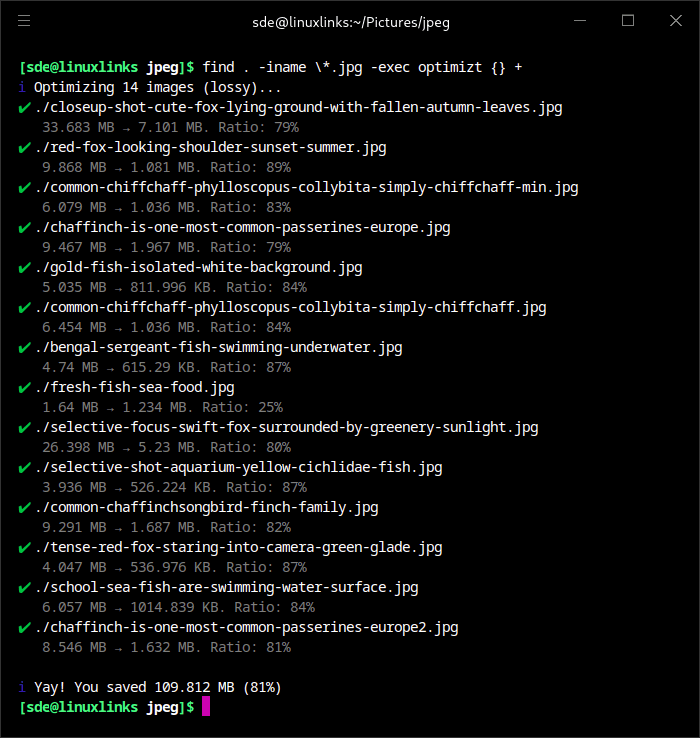
Optimizt is a command-line image optimisation tool aimed at preparing graphics for websites and other frontend projects. It brings several established image-processing utilities behind one interface so developers do not need separate commands for each image format.
The program handles PNG, JPEG, GIF and SVG files and can also generate AVIF and WebP versions of raster images. It supports its default lossy workflow as well as an alternative processing mode intended to favour image quality, with behaviour tailored to the format being processed.
Optimizt can work on individual files, groups of files or directory trees, and its processing rules can be changed through a project configuration file.
This is free and open source software.
Key Features
- Optimises PNG, JPEG, GIF and SVG images from a single command-line interface.
- Can create AVIF and WebP alternatives for raster images.
- Uses sharp for PNG, JPEG, AVIF and WebP processing.
- Uses SVGO to optimise SVG markup and gifsicle for GIF compression.
- Offers separate lossy and lossless-labelled processing modes.
- Can recursively process directories as well as explicit image files.
- Supports writing optimised images to a separate output directory while preserving the source directory structure.
- Can add custom prefixes and suffixes to generated filenames.
- Provides a force option for regenerating AVIF and WebP files that already exist.
- Uses a configurable CJS file containing per-format compression and conversion settings.
- Searches parent directories for project configuration, allowing settings to live with the source tree.
- Lets individual configuration parameters be disabled when a particular optimisation is undesirable.
- Uses Guetzli for JPEG processing in its lossless-labelled mode; upstream cautions that repeated optimisation can still degrade visual quality.
- Provides verbose output for inspecting skipped files and other processing details.
- Can be integrated with editors and automated development workflows.
- Is distributed as a command-line package rather than a general-purpose JavaScript API.
Website: github.com/343dev/optimizt
Support:
Developer: Andrey Warkentin
License: MIT License
optimizt is written in JavaScript. Learn JavaScript with our recommended free books and free tutorials.
Related Software
| Console Based Image Compression Tools | |
|---|---|
| MozJPEG | Mozilla JPEG Encoder Project |
| pngquant | Utility and a library for lossy compression of PNG images |
| SVGO | Node.js library and command-line application for optimizing SVG files |
| Oxipng | Multithreaded PNG optimizer, forked from Optipng |
| libjxl | Reference implementation of JPEG XL |
| libjpeg-turbo | JPEG image codec |
| QOI | The Quite OK Image Format |
| YOGA | Yummy Optimizer for Gorgeous Assets |
| pngcrush | Optimizer for PNG files |
| jpegoptim | Optimize JPEG files. Lossless and lossy compression available |
| OptiPNG | Advanced PNG optimizer |
| ECT | Fast and effective C++ file optimizer |
| Crunch | Lossy PNG image file optimization |
| zopflipng | PNG optimisation tool using zopfli |
| JPEG Archive | Utilities for archive JPEGs for long term storage |
| cavif | Convert PNG and JPEG images to space-saving AVIF format |
| optimizt | CLI image optimization tool |
| Flaca | Losslessly compress GIF, JPEG and PNG images from the terminal |
| picopt | Multi format lossless image optimize |
| tinifier | CLI tool for compressing images using the TinyPNG API |
Read our verdict in the software roundup.
 Explore our carefully curated directory of recommended free and open source software, covering every major software category. Explore our carefully curated directory of recommended free and open source software, covering every major software category.The directory forms part of our extensive collection of articles for Linux enthusiasts. It includes hundreds of detailed reviews, together with free and open source alternatives to proprietary software from companies such as Google, Microsoft, Apple, Adobe, IBM, Cisco, Oracle, and Autodesk. LinuxLinks also covers interesting projects worth exploring, Linux-compatible hardware, free programming books and tutorials, and much more. Know a useful free and open source Linux application that we haven’t covered? Tell us about it using our submission form. |
Please read our Comment Policy before commenting.