
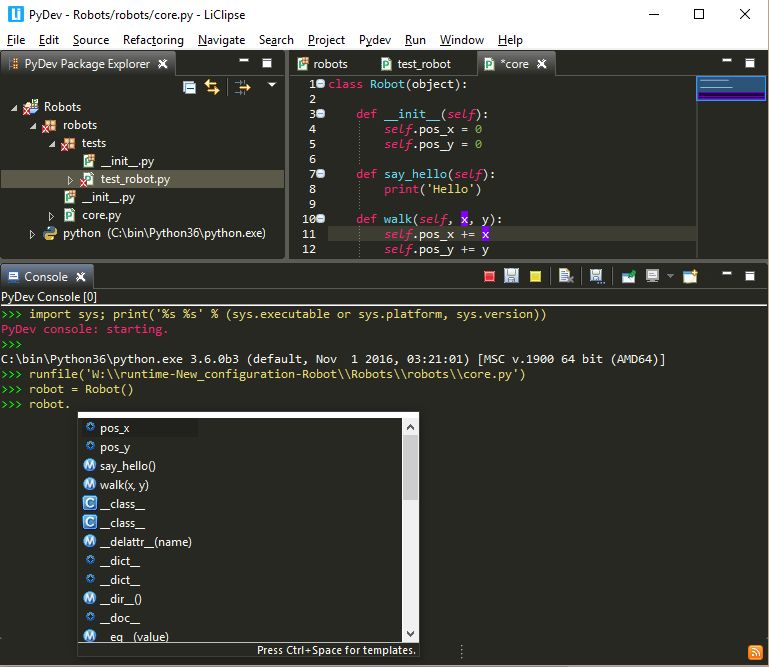
PyDev is an open source Python plugin for Eclipse.
PyDev is an Integrated Development Environment (IDE) used for programming in Python supporting code refactoring, graphical debugging, code analysis among other features.
The recommended way of using PyDev is bundled in LiClipse, which provides PyDev builtin as well as support for other languages such as Django Templates, Mako, RST, C++, CoffeScript, Dart, HTML, JavaScript, CSS, among others.
Key Features
- Django integration.
- Django templates editor (requires LiClipse).
- Code completion with auto import.
- Documentation hovers – hovering over some element in the console shows docstrings (or other suitable description if not available).
- Type hinting with hints for code-completion with docstrings by commenting types with the Sphinx/Epydoc format.
- Code analysis – provides error finding in Python programs. It finds common errors such as undefined tokens, duplicated signatures and warns about things such as unused variables or unused imports. PyDev finds undefined variables, undefined variables from import, unused variables, unused imports, unused wild imports, duplicated signatures, import redefinition, unresolved imports, no ‘self’ tolk declared in a class method, mixing indentation with tabs and spaces, and bad indentation.
- Go to definition.
- Interactive console – allows interactive editing, running and debugging of a Python project.
- Refactoring – keybinding, supports preview, integrated in the editor, supports undo/redo in the workspace, rename class, rename method, rename attribute, rename imports, and rename local variable.
- Debugger – supports step in, step over, step return, continue, breakpoints (with optional condition), stack view showing multiple threads, locals and globals variable display, expressions display, temporary display for selection, and hover showing the selected expression evaluation.
- Remote debugger.
- Full debug support in interactive console.
- Find referrers in debugger.
- Tokens browser.
- Unittest integration – allows using different test runners, and see the results in a view with a red/green bar. The PyUnit view shows the results of tests being run, their output, time, re-running tests, among others.
- Outline view.
- Code coverage – code coverage integration in PyDev.
- Code folding.
- PyLint integration – a source code, bug and quality checker for Python.
- Find References (Ctrl+Shift+G).
- CPython, Jython and IronPython support.
- TODO tasks.
- Content Assistants:
- Assign result to attribute or local.
- Surround code with try..catch / finally.
- Create docstring.
- Move import to global scope.
- Python 2.x and 3.x syntax
Website: www.pydev.org
Support: Documentation, GitHub, Blog, Mailing List
Developer: Appcelerator
License: Eclipse Public License
PyDev is written in Python. Learn Python with our recommended free books and free tutorials.
Related Software
| Python Integrated Development Environments | |
|---|---|
| PyCharm | Full-featured IDE. Two editions are available, one is open source software |
| Spyder | Python development environment providing MATLAB-like features |
| eric | Full featured Python editor and IDE, written in Python |
| Thonny | Tk-based IDE designed for novice programmers |
| PyDev | Python plugin for Eclipse |
| Leo | PIM, IDE and outliner |
| Pyzo | Interactive editor for scientific Python |
| PTK | Interactive environment for Python |
| IDLE | Python’s Integrated Development and Learning Environment |
Read our verdict in the software roundup.
| Integrated Development Environments | |
|---|---|
| RStudio | Enterprise-ready professional software for R |
| PyCharm | Integrated Development Environment for Python |
| Neovim | Continuation and extension of Vim |
| Lapce | Fast and powerful code editor written in Rust |
| NetBeans IDE | Java based IDE from Apache |
| VSCodium | Binary distribution of VS Code |
| Eclipse | Java based environment combining a number of different Eclipse projects |
| Qt Creator | Cross-platform, complete Integrated Development Environment |
| Spyder | The Scientific Python Development Environment |
| KDevelop | An easy to use IDE for KDE |
| Helix | Post-modern modal text editor |
| Theia | Cloud & desktop IDE framework |
| eric | Full featured Python editor and IDE |
| Thonny | Python Integrated Development Environment for Beginners |
| Lazarus | Delphi compatible cross-platform IDE |
| PyDev | Python Integrated Development Environment for Eclipse |
| Gambas | Development environment and a full powerful development platform |
| Che | Kubernetes based Cloud Development Environments for Enterprise Teams |
| Leo | Python based IDE, Outliner and PIM |
| IntelliJ IDEA | IDE for Java, Groovy, and other languages |
| LiteIDE | Edit and build Go projects |
| Arduino IDE | Electronics prototyping platform |
| ZeroBrane Studio | Lightweight Lua-based IDE for Lua |
| CodeLite | Powerful and lightweight C/C++ IDE |
| Pyzo | Cross-Platform Python IDE focused on interactivity and introspection |
| DrRacket | IDE for the Racket programming languages |
| Builder | IDE for GNOME |
| Geany | Small and lightweight IDE based on Scintilla |
| Code::Blocks | Very extensible and fully configurable |
| Ecere SDK | Software development kit |
| Zasper | IDE for Data Science |
| U++ | Rapid application development framework |
| roobuilder | Vala and JavaScript IDE |
Read our verdict in the software roundup.
 Explore our comprehensive directory of recommended free and open source software. Our carefully curated collection spans every major software category. Explore our comprehensive directory of recommended free and open source software. Our carefully curated collection spans every major software category.This directory is part of our ongoing series of informative articles for Linux enthusiasts. It features hundreds of detailed reviews, along with open source alternatives to proprietary solutions from major corporations such as Google, Microsoft, Apple, Adobe, IBM, Cisco, Oracle, and Autodesk. You’ll also find interesting projects to try, hardware coverage, free programming books and tutorials, and much more. Discovered a useful open source Linux program that we haven’t covered yet? Let us know by completing this form. |
Please read our Comment Policy before commenting.