
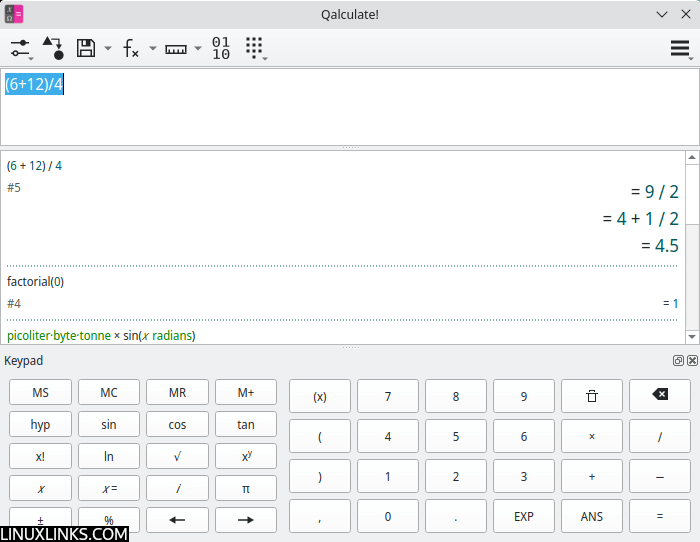
Qalculate! is a powerful desktop calculator that combines everyday arithmetic with mathematical functionality normally associated with much larger applications. It can handle everything from percentage calculations and currency conversions to symbolic algebra, calculus and graph plotting.
The calculator takes a flexible approach to entering expressions. Rather than requiring every operation to be entered separately, you can type complete expressions containing numbers, functions, variables, constants and units. Results can be displayed in exact or approximate form, with support for arbitrary precision and uncertainty calculations.
Qalculate! offers both GTK and Qt graphical interfaces, together with a separate command-line application. The graphical interfaces provide calculation history, function management, conversion tools and configurable keypads. The Qt interface also supports customisable workspaces for switching between different tasks and settings.
The software continues to receive regular development. Version 5.13, released in October 2026, improved symbolic equation solving and integration, while the preceding release added LaTeX input and output. Graph plotting is handled through Gnuplot.
This is free and open source software.
Key Features
- Enter complete mathematical expressions using flexible, fault-tolerant parsing and automatic completion.
- Perform arbitrary-precision calculations with complex numbers, fractions, interval arithmetic and uncertainty propagation.
- Carry out symbolic operations including simplification, factorisation, differentiation, integration and equation solving.
- Provides hundreds of mathematical, statistical, financial and scientific functions, together with custom functions and variables.
- Convert between physical units, currencies, number bases and other measurement systems.
- Work with matrices, vectors, physical constants and data sets.
- Plot mathematical functions and numerical data using Gnuplot.
- Offers GTK and Qt graphical interfaces with calculation history, configurable keypads and function management.
- Supports Reverse Polish Notation (RPN) and exact or approximate result modes.
- Provides tools for number-base conversion, calendar calculations and LaTeX input and output.
Website: qalculate.github.io
Support: Manual
Developer: Hanna Knutsson
License: GNU General Public License v2.0
Qalculate! is written in C++. Learn C++ with our recommended free books and free tutorials.
Related Software
| Calculators | |
|---|---|
| Qalculate! | Powerful and easy to use multi-purpose desktop calculator |
| Genius | Desktop calculator, an educational tool in mathematics, and for research |
| SpeedCrunch | High precision and powerful desktop calculator |
| KCalc | Scientific calculator designed for KDE |
| Calculator | Simple and easy to use calculator |
| KAlgebra | Replace your graphing calculator |
| rpCalc | Simple RPN calculator |
| Kalk | Cross-platform application built with the Kirigami framework |
| Modular Calculator | Aimed at scientific, engineering or computing work |
| Nonpareil | High-Fidelity calculator simulator |
| Wombat | High-precision scientific calculator |
| Uno Calculator | Port of Windows calculator |
| SwitchCalc | GTK4 calculator |
| Schulrechner | Calculator you know from school |
| Pebbles | GTK-based app |
| Cuneo | Widget-like calculator and conversion tool |
| RCalc | RPN calculator |
| galculator | RPN and algebraic calculator |
| gdcalc | Financial, scientific, statistical and programming calculator |
| Sums | Postfix calculator designed for quick calculations |
| JRPN | RPN programmer's calculator inspired by the classic HP-16C |
| Free42 | HP-42S calculator simulator |
| COSMIC Calculator | Native COSMIC desktop calculator with calculation history |
| Yutovo | Visual calculator combining mathematical notation and editable text |
| Yesser Calculator | Extensible calculator |
| xcalc | Simple scientific calculator that can emulate a TI-30 or an HP-10C |
| x48ng | Reboot of the HP 48 emulator |
| tCalc | Simple calculator written in core Tcl/Tk |
| OxiCalc | Small, simple calculator. It uses GTK4. |
| NumNum | Calculator supporting variables, units and currencies |
| MCalc | Perform simple mathematical operations |
| Eigen | GTK4 matrix calculator |
Read our verdict in the software roundup.
 LinuxLinks helps you discover the best free and open source software for Linux. Explore our extensive collection of recommended applications, including alternatives to popular proprietary software. LinuxLinks helps you discover the best free and open source software for Linux. Explore our extensive collection of recommended applications, including alternatives to popular proprietary software.We also publish software reviews, Linux tutorials, hardware reviews, free programming books and articles covering the wider open source community. Browse our Linux resources to discover more. Know a useful free and open source Linux application we haven't covered? Suggest a program for inclusion. Has your software been featured on LinuxLinks? Display one of our Featured on LinuxLinks badges on your website or GitHub README. |
Please read our Comment Policy before commenting.
why don’t these calculators have “memory” functions such as M+ M- MRC MC.
not only is this useful, it is practically necessary for the simplest day-to-day budgetary or financial calculations.
even the cheapest hand held calculators (like at the dollar stores?) ALL have this function
and yet, and yet, almost NONE of these calculators, even the “advanced” calculators
I hate to say it, but even Windows has this on their basic calculator. Did they get it right by accident?
Qalculate has a “STO” button (similar to TI graphing calculators) which lets you assign a result to an arbitrary variable name. You can also use ‘:=’ (colon, equals) for variable assignment, as in ‘x:=x+1’.
Anyway, Qalculate seems to be more of a “computer algebra system” than a “calculator” in the conventional sense that you’re looking for.
Since every desktop environment I can think of has a built in calculator program (with memory functions), it’s hard to understand why you’d be frustrated by this.
it is not at all difficult to understand why he is frustrated by the lack of the memory buttons. They are very handy to have available. My thought is why are YOU not concerned that the memory buttons are missing.
It’s quite simple really. If you are so concerned by any missing functionality, you can:
a) raise an issue on the project’s GitHub page, requesting the *missing* feature(s) are added. The developers will consider any request. They might decide to add what you want, or explain why they won’t.
The fact that you don’t appear to have done this (or for that matter anyone else) indicates that the program’s userbase doesn’t consider the functionality in question to be important as you suggest.
b) code the *missing* feature yourself. If the developer doesn’t accept the code…
c) fork the project, apply the code, or pay someone to write the code if you are unable to develop, or don’t have the time to do so.
That’s the beauty of open source.
Wow. Genius. Whenever I see the “go fix it yourself” crowd surrounding an open-source project, I know to not use that b/c I can expect to implement every other standard missing feature & I might as well be maintaining my own software at that point.
NICE!
Thanks for this great article on “Qalculate!”. I have used Galculator for while now because of its being available through the usual repositories (and as a default on many Debian distros). However, being that I am very interested in custom functions for various technical uses, Galculator has me hitting my head at the ceiling of its limitations.
Qalculate! sounds like the one for me and my needs for advanced technical mathematics. My main thing, I need to be able to craft and use functions that will probably require two or more inputs anyway, and it sounds like Qalculate! may again fit the bill?
So, based on what I have read here, I am going to try it out.
Once again, Thanks for fine article.
– Jim S.
Anyone know how to put a comment or whatever in before, during or after doing a calculation? If I calculated the partial volume of a cylinder (horizontal), which is good for knowing things like how much fuel is in a tank, it would be nice to have a comment before, during or after I made the calculation — so that when I was going through my history later, looking through 500 calculations, I could say “Yep, there that feller is!”. Since I don’t know that formula by heart, because I don’t work in a field where I do that calculation so I do it 50 times a day and have it memorized, but I did it once because it was important for some reason at the time, and I need to know how I did it again. As someone said in a comment on another site, you might not (gasp! horror!) have access to the Internet at the time, so you can’t just google “calculate partial volume of a cylinder” or “calculate remaining volume in a tank” or some such.
The documentation is extremely poor. For example, how would one change the parsing mode in the CLI version. The only way I’ve found is to exit and restart. That makes it too frustrating to use.
Check the project’s GitHub as a starter, a lot of useful information is contained in a project’s Issues (open and closed).
If you can’t find anything there, raise an issue.