
SciDAVis is a free interactive application aimed at data analysis and publication-quality plotting.
It combines a shallow learning curve and an intuitive, easy-to-use graphical user interface with powerful features such as Python scriptability and extensibility.
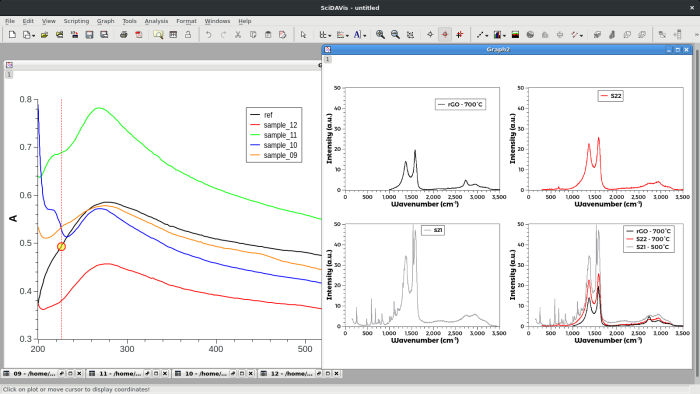
SciDAVis is a dynamic tool, the plots created from data sets and the spreadsheets owing the data are inter-conected. When the spreadsheets are modified, all the objects in the depending plots (curves, axes scales, legends) are automatically updated. For example, deleting a spreadsheet or only some columns will automatically remove all the corresponding curves from the depending plots.
The SciDAVis project started as a fork of QtiPlot with the aim of introducing some changes in design as well as project structure.
Key Features
- Tables (2D data), matrices (3D data), graphs (2D or 3D plots) and notes (text notes or scripts) are gathered in a Project and can be organized using folders.
- Data for tables or matrices can be entered directly or imported from ASCII files.
- Cell values in tables can be computed using standard and special functions (and much more if you have Python installed). Each table cell can be assigned an individual formula.
- Multi-level undo/redo for tables and matrices.
- Many built-in analysis operations like column/row statistics, (de)convolution, FFT and FFT-based filters.
- Extensive support for fitting linear and nonlinear functions to the data, including multi-peak fitting.
- Publication-quality 2D plots of various types including symbols/lines, bars and pie charts which can be exported to a variety of formats (JPG, PNG, EPS, PDF, SVG and more).
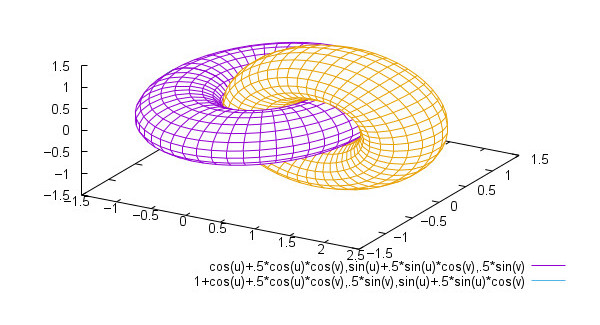
- Interactive 3D plots with export to a variety of formats, including EPS and PDF.
- Internationalization support.
- Cross-platform support – runs under Linux, Mac OS X, and Windows.
SciDAVis uses code from QtiPlot.
Website: scidavis.sourceforge.net
Support: Handbook, SciDAVis, Mailing Lists, GitHub Code Repository
Developer: Tilman Benkert, Knut Franke, gbm19, Arun Narayanankutty, Russell Standish and many contributors
License: GNU General Public License version 2 or any later version
SciDAVis is written in C++. Learn C++ with our recommended free books and free tutorials.
Related Software
| Plotting Tools | |
|---|---|
| matplotlib | Python based plotting system in a style similar to Matlab |
| ggplot2 | Powerful R package for declaratively creating graphics |
| gnuplot | Command-line driven interactive plotting program |
| ROOT | Solves the data analysis challenges of high-energy physics |
| Octave | Built-in plotting and visualization tools |
| DataMelt | Produces professional graphics with libraries for data manipulation |
| Veusz | Scientific plotting and graphing program |
| LabPlot | Data plotting and function analysis tool for KDE |
| PyQtGraph | Scientific Graphics and GUI Library for Python |
| Makie | interactive data visualizations and plotting for Julia |
| GLE | Graphics Layout Engine |
| PyVista | 3D plotting and mesh analysis |
| PLplot | Scientific plotting library |
| AlphaPlot | Fork of SciDAVis |
| SciDAVis | Scientific Data Analysis and Visualization |
| RLPlot | Generate publication quality graphs |
| Genius | Educational tool in mathematics and for research |
| ZeGrapher | 2D math and data plotter |
| Uniplot | Lightweight terminal plotting library for Python |
| Kst | Real-time large dataset viewing and plotting tool |
| Ctioga2 | Command-line plotting utility |
| Plots | Simple graph plotting app for GNOME |
| brplot | Ssmall application and library that plots data |
| SSPlot | Simple plotting utility and numerical simulator |
| KmPlot | Supports Cartesian, parametric, polar, implicit and differential plots |
| Charta | Generate colorful terminal graphs |
| Incplot | Command like tool for drawing great looking plots in the terminal |
Read our verdict in the software roundup.
 Explore our carefully curated directory of recommended free and open source software, covering every major software category. Explore our carefully curated directory of recommended free and open source software, covering every major software category.The directory forms part of our extensive collection of articles for Linux enthusiasts. It includes hundreds of detailed reviews, together with free and open source alternatives to proprietary software from companies such as Google, Microsoft, Apple, Adobe, IBM, Cisco, Oracle, and Autodesk. LinuxLinks also covers interesting projects worth exploring, Linux-compatible hardware, free programming books and tutorials, and much more. Know a useful free and open source Linux application that we haven’t covered? Tell us about it using our submission form. |
Please read our Comment Policy before commenting.