

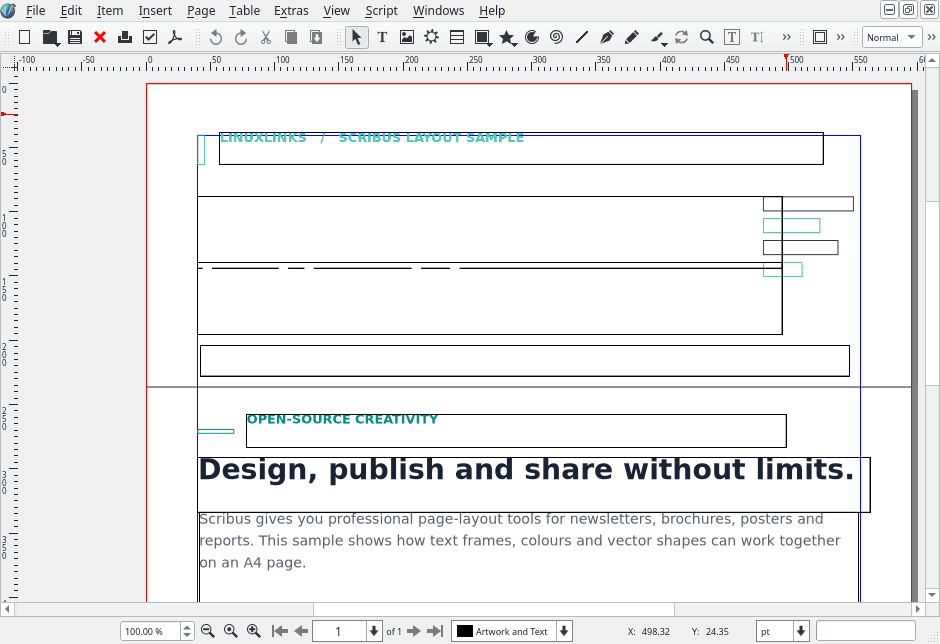
Scribus is a desktop publishing application for creating professional page layouts. It is designed for producing books, magazines, brochures, newsletters, posters and other documents where precise control over typography and printed output is important.
Unlike a traditional word processor, Scribus uses a frame-based layout system. Text, images and graphical elements can be positioned independently, allowing designers to construct complex pages with consistent spacing and alignment.
The application is particularly suited to preparing documents for commercial printing, with extensive colour management and prepress facilities.
This is free and open source software.
Key Features
- Create single-page and multi-page documents with precise control over page dimensions, margins and bleeds.
- Arrange text, images, shapes and tables using independently positioned frames.
- Link text frames so content flows automatically across pages.
- Use master pages to maintain consistent layouts throughout publications.
- Organise document elements using layers, guides, grids and snapping controls.
- Apply paragraph and character styles for consistent typography.
- Support OpenType fonts, advanced text shaping and multilingual typesetting.
- Import text from supported document formats, including OpenDocument, Word and RTF.
- Import vector and bitmap graphics, including SVG, EPS, TIFF and PSD.
- Create and edit vector shapes, paths, gradients and transparency effects.
- Manage RGB, CMYK and spot colours with ICC colour profiles.
- Preview colour separations, ink coverage and potential printing problems.
- Export print-ready PDF documents with professional prepress options.
- Use the Preflight Verifier to identify potential document errors before exporting.
- Create interactive PDF forms and presentation documents.
- Collect fonts, images and other resources needed for document output.
- Automate repetitive publishing tasks through Python scripting.
- Cross-platform support – runs on Linux, macOS, and Windows.
Website: www.scribus.net
Support:
Developer: Scribus Team
License: GNU General Public License v2.0
Scribus is written in C++. Learn C++ with our recommended free books and free tutorials.
Related Software
| PDF Tools | |
|---|---|
| Scribus | Desktop page layout software producing commercial grade PDF output |
| ONLYOFFICE | Cloud online office suite with great PDF functionality |
| LibreOffice Draw | Vector graphics editor and diagramming tool that can create PDFs |
| PDFBox | Java tool for working with PDF documents |
| Ghostscript | Ghostscript PostScript / PDF interpreter |
| Dangerzone | Make PDFs safe |
| pdf-compress | Compress an overly large PDF file to smaller monochrome |
| PoDoFo | Easy to use PDF parsing and creation library |
| veraPDF | Industry supported PDF/A validation |
| pdfgrep | Command-line utility to search text in PDF files |
| Rescribe | Desktop tool for performing OCR |
| PDF4QT | PDF editor |
| Scans to PDF | Create small, searchable PDFs from scanned documents |
| rst2pdf | Converts reStructuredText files into styled documents |
| Paper Clip | Edit PDF document metadata |
| open-pdf-sign | Adds standards-based digital signatures, timestamps and validation |
| pdfposter | Print large posters on multiple sheets |
| plakativ | Stretches PDF or raster image across multiple pages |
| PDF Metadata Editor | Simple GUI tool |
| unlockR | Simple tool to decrypt PDF files |
| pdfresurrect | Analyze PDF documents |
| Densify | Compress PDF files using Ghostscript |
| IceBox | Converts images into a PDF file |
Read our verdict in the software roundup.
 LinuxLinks helps you discover the best free and open source software for Linux. Explore our extensive collection of recommended applications, including alternatives to popular proprietary software. LinuxLinks helps you discover the best free and open source software for Linux. Explore our extensive collection of recommended applications, including alternatives to popular proprietary software.We also publish software reviews, Linux tutorials, hardware reviews, free programming books and articles covering the wider open source community. Browse our Linux resources to discover more. Know a useful free and open source Linux application we haven't covered? Suggest a program for inclusion. Has your software been featured on LinuxLinks? Display one of our Featured on LinuxLinks badges on your website or GitHub README. |
Please read our Comment Policy before commenting.