
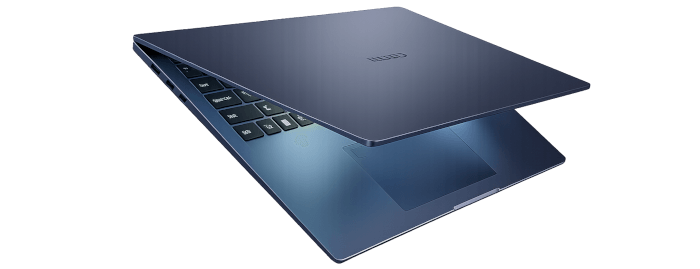
This is a new series looking at the Chuwi CoreBook Air Plus running Linux. In this series I’ll examine every aspect of this laptop from a Linux perspective.
The Chuwi CoreBook Air Plus positions itself as a lightweight, mid-range productivity machine that blends premium materials with competent processing hardware at a sub-£500/$550 price point. Powered by AMD’s Zen 3+ architecture and RDNA2 integrated graphics, it seeks to offer business-class practicality without enterprise pricing.
The Chuwi CoreBook Air Plus has a price of $629 (that’s not an affiliate link). There’s a $50 early bird discount available which brings the price down to $579. And Chuwi is offering LinuxLinks readers a 13% discount on the purchase price. Use the discount code LinuxAirPlus at the checkout. With both discounts applied, the price is $547.23. For UK readers, this means the laptop costs around £400. There’s also a 14-inch model available (the Chuwi Corebook Air) at a lower price.
For the first article in the series, I’ll review the hardware. Later articles in the series will focus more on the laptop from a Linux perspective.
What’s in the Box
- Laptop.
- Power cable. Mine came with a UK plug. 65W USB-C charger.
- Small user manual
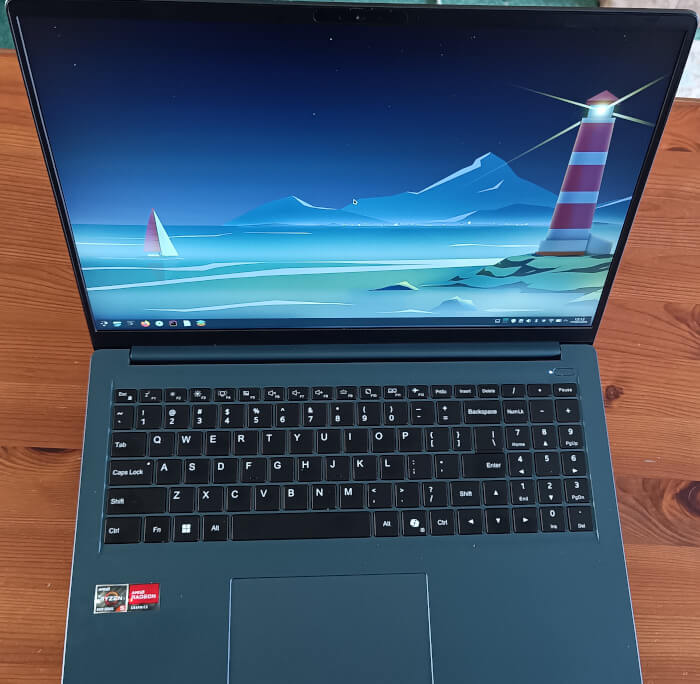
The machine comes with Windows 11 Pro preinstalled. I did let Windows run through its updates (which always takes longer than starting afresh with a Linux distribuution). I briefly tested the laptop in Windows 11 Pro before wiping and installing Linux.
Design and functionality
The Air Plus is offered in Indigo Blue and has an attractive appearance.
For a £400 laptop, the design is very impressive. The CoreBook Air Plus sports anodized and sandblasted aluminium alloy top and bottom panels, delivering torsional rigidity and a premium tactile finish rarely found at this price tier. It has a smooth matte surface. The chassis is sturdy. All parts fit well together with no creaks or funny noises in the frame. Functionally, the laptop offers good grip on a desk, uncompromising inputs, and an ample armrest.
At just 1.35 kg and 9-16.3 mm thick, the Air Plus sits firmly within the ultraportable class, optimized for commuters, students, and professionals. It will fit into any backpack or laptop bag without issue. For a laptop with a 16″ screen it’s one of the lightest available.
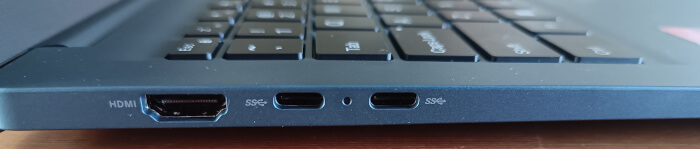
As for the IO ports, the left hand side has:
- HDMI 2.1 (TMDS) to connect to a larger display or projecter. I’ve tested the HDMI with a couple of 4K monitors at 60Hz.
- 2 × USB-C 3.2 Gen 2×1 (full-featured). I’ve connected a variety of devices including external SSDs getting 1000 MB/s read and write speeds.
The right hand side offers:
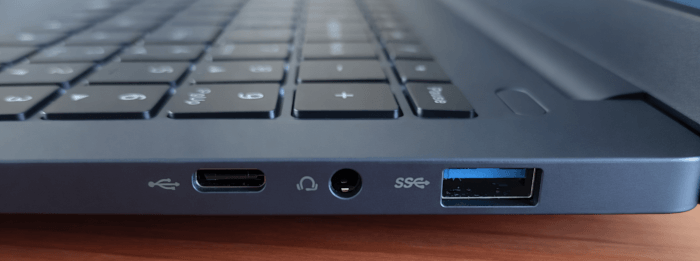
- 1 × USB-C (data only)
- 3.5mm audio jack
- USB 3.2 Gen 1 Type-A
Sadly there are no USB 4.0 ports but remember this is an inexpensive laptop.
The laptop has a 2MP webcam which works well with Linux software such as Webcamoid. There’s also 2W stereo speakers with low distortion but nothing particularly notable.
Keyboard, touchpad
My laptop has a full-size US keyboard layout. The keyboard is a decent typer, with softly coated keys, reasonable key travel, satisfying tactile feedback, and quiet auctuations. It has good spacing, two level backlighting, and full size arrow keys although I’d prefer a larger Enter key. The US layout also takes getting used to as I normally use a UK layout.
The keys are backlit with white LEDs. There are two brightness levels to choose from and some lights bleeds from underneath the keys. There’s a Copilot key. Thank you, Microsoft! But at least it hasn’t replaced the right Ctrl or Alt key.
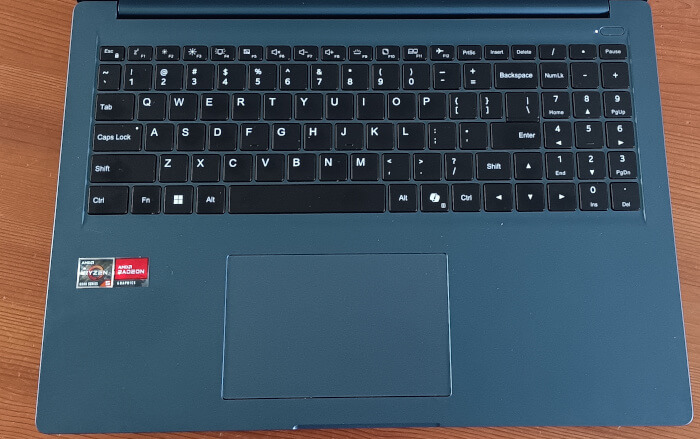
The touchpad is wide and tall. It has a smooth feel and reliable experience with general use but it’s not as responsive or precise as other laptops I use. Clicks are firm though. There’s proper physical separation between this touchpad and the armrest around, as well as good space up to the keyboard. This reduces the likelihood of unwanted contact during everyday use, whether the laptop is resting on your lap or thighs. In any event I usually connect an external mouse where possible as they are a boon to productivity.
Display
There’s a 16-inch WUXGA IPS display with 1920×1200 resolution and an aspect ratio of 16:10. The aspect ratio is a distinct advantage over the usual 16:9. The laptop has narrow bezels enough for the space needed for the camera. The display has a peak brightness of slightly higher than the specified 300 Nits.
I’d prefer a higher peak brightness for outside use but I’ve hardly seen the sun appear from cloud cover for the last month. Colour accuracy figures are better than I’d expect at this price point and more than sufficient for office type work and general usage.
Hardware and Performance
Spec-wise, the laptop is based on the 2022 AMD Rembrandt hardware platform, with Ryzen 5 processor and AMD Radeon graphics. The AMD Ryzen 5 6600H has 6 cores, 12 threads. It features a 3.3 GHz base clock, up to 4.5 GHz boost, and 16 MB L3 cache. While the CPU is not a current generation, this probably helps using Linux from a compatibility perspective particularly if you run Linux distributions which use old versions of the kernel.
On the GPU side, the AMD Ryzen 5 6600H bundles the Radeon 660M graphics, featuring 384 shading units, 24 texture mapping units, and 16 ROPs. The card also has 6 raytracing acceleration cores. The GPU is operating at a frequency of 1500 MHz, which can be boosted up to 1900 MHz.
Our configuration also comes with 16GB of LPDDR5-6400 memory. A sticker on the box indicates various configurations:
CPU: AMD Ryzen 5 6600H or AMD Ryzen 7 H255
Memory: 8GB, 16GB or 32GB
Storage: 256GB, 512GB, 1TB, or 2TB
For storage, Chuwi opted for a 512GB PCIe gen3 drive. While it’s not a particularly fast SSD, it’s balanced with the rest of the hardware. The SSD is upgradeable so you can put in a PCIe gen 4 drive.
There’s a 60Wh battery, Wi-Fi 6, and Bluetooth 5.2.
I’m going to cover benchmark performance in a later article in this series. For now, I would say that the laptop is more than capable of most business and home-related tasks. It’s been ideal for updating this website (and I do a lot of compiling software). While the AMD Ryzen 5 processor is not the latest generation (or even the latest but one), performance is still decent.
Summary
✅ The Good
- Excellent build quality
- Stylish appearance
- Decent CPU performance considering its price
- Decent battery life in Linux getting 7-8 hours with light usage. Expect a bit less if you use Windows
- Whisper quiet unless the CPU is heavily stressed
- Extremely portable
- Full-sized arrow keys and a NumPad, as well as the robust port selection
❌ The Bad
- While display is very good for the class of laptop I’d prefer higher brightness
- CPU tends to run quite hot under sustained load
- Keyboard and trackpad could be better
- Not for gaming
The Chuwi CoreBook Air Plus is an ultra lightweight portable 16-inch laptop with decent performance in Linux. On balance, the Air Plus represents excellent value for month. It strikes a consummate balance between cost and performance.
The next article in the series will look at the laptop’s specifications in more detail.
Complete list of articles in this series:
| Chuwi CoreBook Air Plus | |
|---|---|
| Hardware Review | A concise look at the hardware |
| Specifications | Using the inxi tool to delve into the laptop's specifications |
| Benchmarks | I put the laptop through a series of benchmarks |
| BIOS | Basic Input/Output System |
| Power Consumption | Testing the laptop's power consumption |
| Battery | Battery life while updating the LinuxLinks website |
| Ubuntu | Configuring Ubuntu 25.10 |