

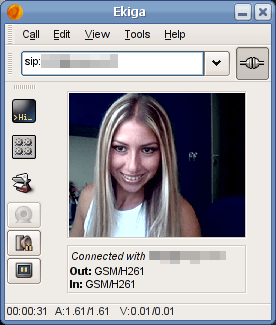
Ekiga (formerly known as GnomeMeeting) is an open source VoIP and video conferencing application for GNOME. Ekiga uses both the H.323 and SIP protocols.
Ekiga is compatible with any software, device or router supporting SIP or H.323. It includes SwissVoice, CISCO, SNOM, … IP Phones, but also software like Windows Messenger, Netmeeting, SJPhone, Eyebeam, X-Lite, … or also the Asterisk popular IPBX, as well as any other commercial or Open Source IPBX. Ekiga is not compatible with Skype.
It supports all major features defined by those protocols like call hold, call transfer, call forwarding, … It also supports basic instant messaging, and has advanced support for NAT traversal. Ekiga supports the best free audio and video codecs, and has wideband support for a superior audio quality, together with echo cancellation.
Ekiga has been designed for the GNOME desktop but it works very well with the KDE desktop too. For example, Ekiga provides an animated icon automatically added in the KDE system tray.
Key Features
General
- Ease of use with a modern Graphical User Interface.
- Audio and Video free calls through the internet.
- Free Instant Messaging through the internet with Presence support.
- Audio (and video) calls to landlines and cell phones with support to the cheapest service providers.
- High Definition Sound (wideband) and Video Quality up to DVD quality (high framerate, state of the art quality codec and frame size).
- Free of choice of the service provider.
- SMS to cell phones if the service provider supports it (like the default provider).
- Standard Telephony features support like Call Hold, Call Transfer, Call Forwarding, DTMF.
- Remote and Local Address Book support: Remote Address Book support with authentification using the standard LDAP technology, Local Address support in Gnome (Evolution).
- Multi platform: Windows and Linux.
- Wide interoperability: Ekiga use the main deployed stantards for telephony protocols (SIP and H.323) and has been tested with a wide range of softphones, hardphones, PBX and service providers.
SIP Features
- SIP Compliant.
- Registrar Support.
- Possibility to Simultaneously Register to Several Accounts.
- Proxy Support.
- Outbound Proxy Support.
- Call Hold.
- Call Transfer.
- Call Forwarding on No Answer, on Busy, Always.
- Configurable Port Ranges.
- Instant Messaging.
- DTMFs Support.
- Message Waiting Indications Support.
- ENUM Support.
- Transparent NAT Support, Assisted NAT Support (STUN, IP
Translation). - SIP re-INVITE support.
H.323 Features Version 2.00
- H.323v4 Compliant.
- H.245 Tunneling and Fast Start.
- Gatekeeper (RAS) Support.
- H.235 Annex D. Support.
- Gateway/Proxy Support.
- H.450.1 Call Hold.
- H.450.2 Call Transfer.
- H.450.3 Call Forwarding on No Answer, on Busy, Always.
- Configurable Port Ranges.
- H.245 Text Chat.
- DTMFs Support.
- ENUM Support.
- Transparent NAT Support, Assisted NAT Support (STUN, IP
Translation).
Codecs Features Version 2.00
- iLBC, GSM-06.10, MS-GSM, G.711-Alaw, G.711-uLaw, G.726,
G.721 and Speex Audio Codecs. - H.261 QCIF Video Code.
- Dynamic Jitter Buffer.
- Dynamic Threshold Algorithm for Silence Detection.
- Echo Cancellation.
- Wideband Codec Support.
- Automatic Video Bandwidth Limitation.
- Video Transmission/Reception Control.
General Features Version 2.00
- Integration with Novell Evolution 2.00.
- LDAP Support.
- Advanced Addressbook.
- Speed Dials.
- Calls History.
- Dialpad.
- Rendez-Vous Support.
- Advanced Personal Settings Management.
- In call Instant-Apply Support for Settings.
- Call Monitoring.
- Auto Answer and Do Not Disturb Modes.
- GConf and External Configuration.
- Possibility for Administrators to Block Some Settings.
- Configurable Full-Screen Video Conferencing.
- OSS and ALSA Compatible Soundcards Support.
- Video4Linux, Video4Linux 2 and Firewire Cameras Support.
- Devices Auto-Detection.
- Status Notion.
- Configurable Sound Events.
- Configuration Assistant.
- Manual.
- HIG Compliant GUI.
- KDE and GNOME Compatibility.
- Translated into Many Languages.
Website: www.ekiga.org
Support: Wiki, Manual
Developer: Damien Sandras (original author and project leader) and other developers
License: GNU General Public License v2.0
Ekiga is written in C++. Learn C++ with our recommended free books and free tutorials.
Related Software
| VoIP Software | |
|---|---|
| Jitsi | Innovative open source voice and video conferencing |
| Mumble | Voice chat application for groups |
| Jami | SIP-compatible softphone and SIP-based instant messenger |
| GNU Gatekeeper | Feature-rich project that implements an H.323 gatekeeper. |
| Kamailio | Build large platforms for VoIP and realtime communications |
| FreeSWITCH | Telephony platform for voice and chat driven products |
| Asterisk | Complete PBX system |
| Wire | Encrypted instant messaging client |
| Galene | Easy to deploy videoconference server |
| Linphone | Voice over IP softphone, SIP client and service |
| Janus | General purpose WebRTC server |
| GOnnect | Easy to use VoIP client |
| Calls | Make phone and SIP calls |
| Ekiga | VoIP and video conferencing application for GNOME |
| qTox | Chat, voice, video, and file transfer IM client |
| Empathy | Instant messaging and voice over IP client |
Read our verdict in the software roundup.
| Webcam Tools | |
|---|---|
| Webcamoid | Full featured and multi-platform webcam suite with a simple interface |
| ZoneMinder | All-in-one security camera solution |
| Motion | V4L capture program supporting motion detection |
| DroidCam | Turn a mobile device into a network-attached IP camera |
| Kerberos.io | Video surveillance solution |
| Clight | Webcam becomes light sensor |
| webcamize | Use your camera as a webcam |
| Guvcview | Full-featured video grabber |
| Cheese | Take pictures and videos from your webcam |
| Kamoso | Qt-based webcam utility |
| Ekiga | VoIP and video conferencing application |
| camera-streamer | Low-latency camera streaming project for Raspberry Pi systems |
| WebCamControl | GUI app for controlling properties of a webcam |
| Photobooth | Photobooth software for the Raspberry Pi and PC |
| HasciiCam | Live ascii video on the web for the masses |
| camorama | View, alter and save images from a webcam |
Read our verdict in the software roundup.
 Explore our comprehensive directory of recommended free and open source software. Our carefully curated collection spans every major software category. Explore our comprehensive directory of recommended free and open source software. Our carefully curated collection spans every major software category.This directory is part of our ongoing series of informative articles for Linux enthusiasts. It features hundreds of detailed reviews, along with open source alternatives to proprietary solutions from major corporations such as Google, Microsoft, Apple, Adobe, IBM, Cisco, Oracle, and Autodesk. You’ll also find interesting projects to try, hardware coverage, free programming books and tutorials, and much more. Discovered a useful open source Linux program that we haven’t covered yet? Let us know by completing this form. |