
A hex editor is a special type of editor that can open any type of file and display its contents, byte by byte. The “hex” in “hex editor” is short for hexadecimal, which is a base-16 number system. This type of editor lets you view and edit binary files. A binary file is a file that contains data in machine-readable form (as opposed to a text file which can be read by a human).
Since a hex editor is used to edit binary files, they are sometimes known as a binary editor or a binary file editor. If you edit a file with a hex editor, you are said to hex edit the file, and the process of using a hex editor is called hex editing.
Hex editors are often used for debugging and reverse engineering binary communication protocols. They can also review files with an unknown file format, reviewing program memory dumps, and hex comparison. Hex editors can help you remove watermarks or other data that is hidden within a file. Hex editors are a favorite tool of game modding communities.
If you use a text editor to open a binary file, you will see large amounts of incomprehensible information, seemingly random accented characters, and long lines overflowing with text. Editing or saving a binary file in a text editor will corrupt the file.
We feature our recommended console hex editors. They are all free and open source software.
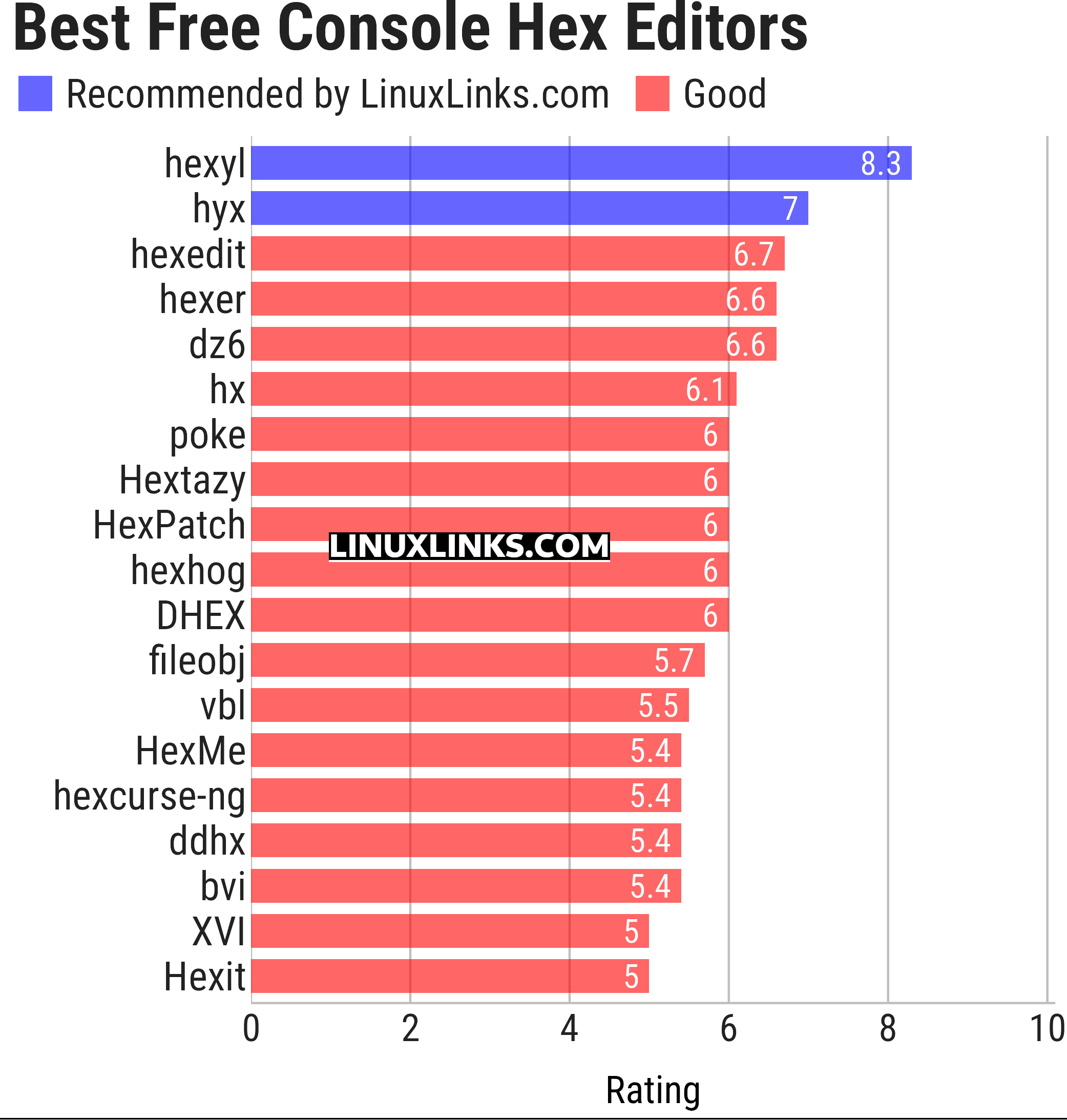
Let’s explore the 19 programs at hand. For each title we have compiled its own portal page, a full description with an in-depth analysis of its features, together with links to relevant resources.
| Console-Based Hex Editors | |
|---|---|
| hexyl | Colored command-line hex viewer |
| hyx | Minimalistic hex editor |
| hexedit | View and edit hexadecimal files |
| hexer | Multi-buffer editor for binary files |
| dz6 | Terminal hex editor with Vim-inspired key bindings |
| hx | Hex editor using plain C and POSIX libs |
| poke | Extensible editor for inspecting and modifying structured binary data |
| Hextazy | Colorful hexadecimal editor |
| HexPatch | Interactive TUI for viewing, editing and patching binary files |
| hexhog | Configurable hex viewer and editor |
| DHEX | ncurses-based hex editor with diff mode |
| fileobj | ncurses based hex editor |
| vbl | Terminal-based hexadecimal viewer and editor for binary files |
| HexMe | Written in C++ that uses the Curses library |
| hexcurse-ng | Written in C |
| ddhx | Simple multi-platform modal text UI hex editor |
| bvi | Based on the vi text editor |
| XVI | Hex editor using ncurses |
| Hexit | Minimalistic hex editor |
This article has been updated to reflect the changes outlined in our recent announcement.
 LinuxLinks helps you discover the best free and open source software for Linux. Explore our extensive collection of recommended applications, including alternatives to popular proprietary software. We also publish software reviews, Linux tutorials, hardware reviews, free programming books and articles covering the wider open source community. Browse our Linux resources to discover more. Know a useful free and open source Linux application we haven't covered? Suggest a program for inclusion. Has your software been featured on LinuxLinks? Display one of our Featured on LinuxLinks badges on your website or GitHub README. |
Please read our Comment Policy before commenting.
vbl is primarily a hex viewer and editor (the kind you would want to have on your rescue stick). Should we categorize it here instead of under “diff-tools“?
You are right linuxCowboy.
I’ll remove vbl from the terminal diff tools roundup and add it to the console hex editors roundup. I’ll also update both roundups ahead of their scheduled refresh dates.
Thanks!