

The internet has rapidly transformed the way we communicate. Since body language and verbal tone are not conveyed in text messages or e-mails, we’ve developed alternate ways to convey nuanced meaning. The most prominent change to our online style has been the addition of two new-age hieroglyphic languages: emoticons and emoji.
Emoji originated from the smiley, which first evolved into emoticons, followed by emoji and stickers in recent years. Smiley first appeared in the 1960s and is regarded as the first expression symbols. Smiley is a yellow face with two dots for eyes and a wide grin which is printed on buttons, brooches, and t-shirts.
An emoji is a pictogram, logogram, ideogram or smiley embedded in text and used in electronic messages and web pages. The main function of emoji is to provide emotional cues otherwise missing from typed conversation.
Here’s our verdict captured in a legendary chart.
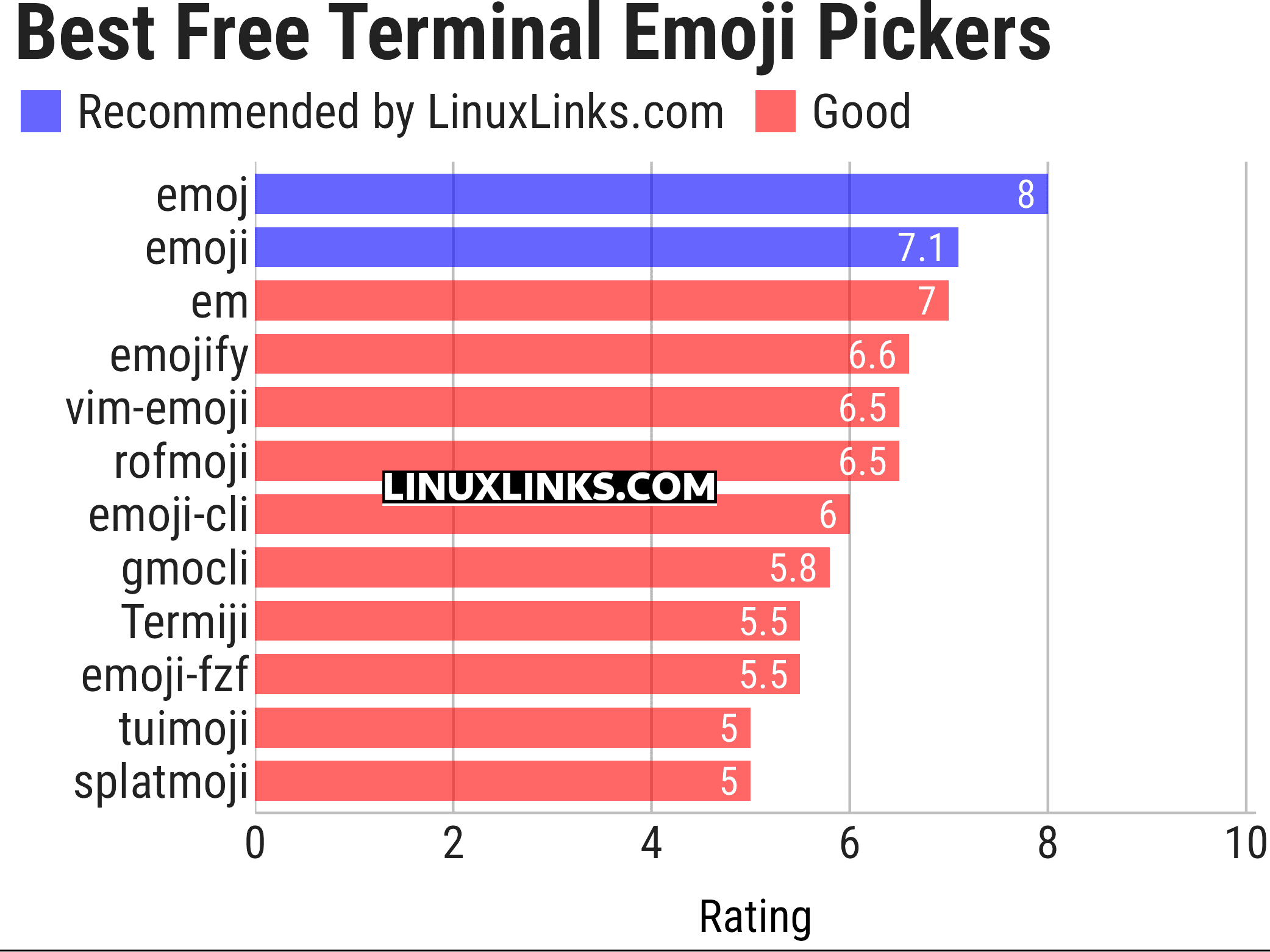
Let’s explore the 12 terminal-based emoji tools. For each application we have compiled its own portal page, a full description with an in-depth analysis of its features, together with links to relevant resources.
| Terminal Emoji Tools | |
|---|---|
| emoj | Find relevant emoji from text on the command-line |
| emoji | emoji terminal output for Python |
| em | Find emoji by name and copy them to the clipboard |
| emojify | Substitutes emoji aliases that many services use for emoji raw characters |
| vim-emoji | Emoji in the Vim text editor |
| rofmoji | Find emoji for your clipboard |
| emoji-cli | Emoji completion on the command line |
| gmocli | Emoji selection with gitmoji support |
| Termiji | Fast terminal-based emoji picker |
| emoji-fzf | Search and retrieve emoji with the fzf fuzzy finder |
| tuimoji | Terminal based emoji chooser |
| splatmoji | Look up and input emoji and/or emoticons/kaomoji |
We cover GUI-based emoji pickers in this article.
This article has been updated to reflect the changes outlined in our recent announcement.
 LinuxLinks helps you discover the best free and open source software for Linux. Explore our extensive collection of recommended applications, including alternatives to popular proprietary software. LinuxLinks helps you discover the best free and open source software for Linux. Explore our extensive collection of recommended applications, including alternatives to popular proprietary software.We also publish software reviews, Linux tutorials, hardware reviews, free programming books and articles covering the wider open source community. Browse our Linux resources to discover more. Know a useful free and open source Linux application we haven't covered? Suggest a program for inclusion. Has your software been featured on LinuxLinks? Display one of our Featured on LinuxLinks badges on your website or GitHub README. |
Please read our Comment Policy before commenting.