

pwvucontrol is a graphical volume control designed specifically for PipeWire.
Its layout follows the familiar model of desktop volume-control utilities while using PipeWire directly rather than relying on a PulseAudio compatibility layer. Playback, recording, output devices, input devices and hardware configuration can therefore be handled from one application. It is a good fit for users who want straightforward mixer controls without working directly with the complete PipeWire graph.
This is free and open source software.
Key Features
- Displays active application playback streams with individual volume controls.
- Shows recording streams independently from normal playback activity.
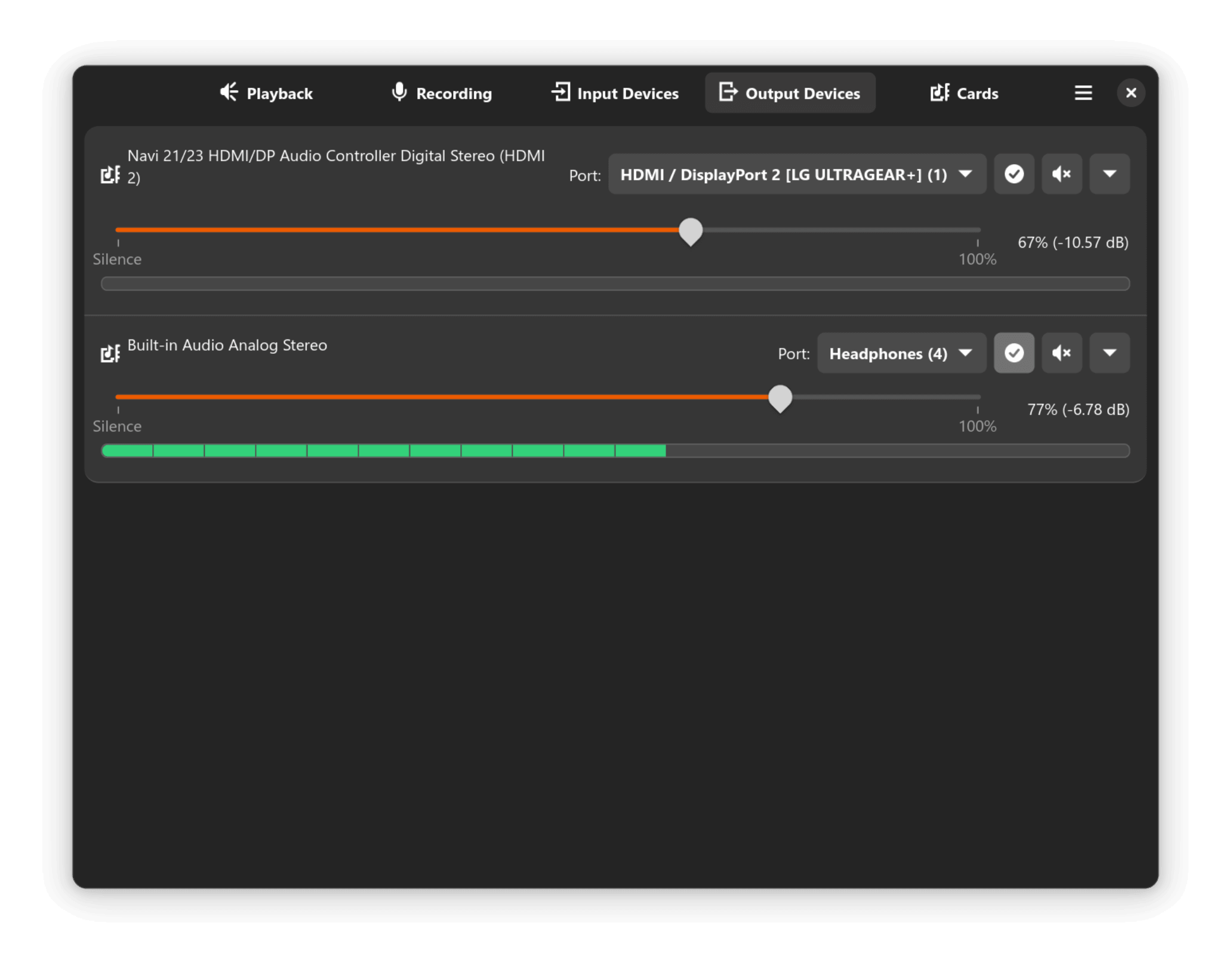
- Adjust output-device volume without changing individual application settings.
- Control microphone and other capture-device levels from the same interface.
- Mute applications, outputs and recording devices independently.
- Real-time peak meters show whether streams and devices are carrying audio.
- Move a playback stream from one output device to another.
- Choose the default output device used for newly created streams.
- Select available profiles exposed by supported audio hardware.
- Switch between available ports on sinks and sources.
- Displays media names and other useful information supplied by applications.
- Remember the previously selected section between sessions.
- Keyboard shortcuts make it quicker to move between the application’s main views.
- Optional LED-style peak display provides an alternative visual meter presentation.
- Optional audible feedback can indicate changes made to output volume.
- Uses WirePlumber integration for managing relevant PipeWire device and routing properties.
- GTK and libadwaita provide an interface suited to contemporary Linux desktops.
Website: github.com/saivert/pwvucontrol
Support:
Developer: saivert
License: GNU General Public License v3.0
pwvucontrol is written in Rust. Learn Rust with our recommended free books and free tutorials.
Related Software
| Audio Effects, Mixers, and PipeWire Routing Tools | |
|---|---|
| Easy Effects | GTK audio manipulation software which includes a range of tools |
| Carla | Modular audio plugin host |
| JamesDSP for Linux | Audio effect processor for Pipewire |
| Pulsemeeter | Audio routing and mixer application |
| wiremix | Terminal mixer for PipeWire audio devices and streams |
| Melodic Mix | Simple mixer and digital signal processing application |
| LSP Plugins | Broad collection of studio-oriented plug-ins |
| Sonusmix | GTK4 audio routing and device management application |
| qpwgraph | Graph manager dedicated to PipeWire |
| pwvucontrol | Pipewire volume control |
| Pipeweaver | Audio management tool built on top of PipeWire |
| coppwr | Low-level GUI for inspecting and controlling PipeWire |
| Helvum | Graphical patchbay for connecting PipeWire audio streams |
Read our verdict in the software roundup.
| Graphical Volume Mixers | |
|---|---|
| pwvucontrol | Pipewire volume control |
| KMix | Sound mixer |
| deej | Hardware volume mixer |
| Myxer | Lightweight, powerful volume mixer built with modern UI design |
| pavucontrol | Simple GTK based volume control tool |
| Mixxc | GTK4-based volume mixer |
| xfce4-mixer | Volume control application based on GStreamer |
| QasTools | Collection of Qt-based mixer and setup tools |
| pavucontrol-qt | Pulseaudio mixer in Qt |
| Mixer | No-frills volume mixer |
| wmsmixer | Hack to wmmixer |
| wmmixer | Mixer application designed for WindowMaker |
| Retrovol | Retro-looking volume setting program |
| hyprmixer | Volume mixer and media controller |
Read our verdict in the software roundup.
 Explore our carefully curated directory of recommended free and open source software, covering every major software category. Explore our carefully curated directory of recommended free and open source software, covering every major software category.The directory forms part of our extensive collection of articles for Linux enthusiasts. It includes hundreds of detailed reviews, together with free and open source alternatives to proprietary software from companies such as Google, Microsoft, Apple, Adobe, IBM, Cisco, Oracle, and Autodesk. LinuxLinks also covers interesting projects worth exploring, Linux-compatible hardware, free programming books and tutorials, and much more. Know a useful free and open source Linux application that we haven’t covered? Tell us about it using our submission form. |
Please read our Comment Policy before commenting.